Azure AI Model Router: Implementation and Production Patterns
After three months running Model Router in production, I wanted to write up what actually works versus what the documentation promises. Part 1 covered the architecture and the decision framework. This post is the implementation: deployment, code, monitoring, and the edge cases that don’t show up until you hit them in production.
Fair warning: this gets technical. I’m showing the .NET code we use, the telemetry that matters, and the gotchas that cost us a few hours of debugging. If you want to skip straight to working code, it’s all on GitHub.
Deploying model router
Deploying Model Router in Azure AI Foundry is straightforward. There’s no complex configuration and no routing mode selection during deployment. You’re up and running in about 2 minutes.
The deployment process:
- Navigate to the Azure Portal
- Search for “Azure AI Foundry” and select it
- Select your Azure AI Foundry project or create a new one
- Go to Models + endpoints → Deploy model
- Search for “model-router” and select it
- Give it a deployment name (I use “model-router”)
- Select deployment type (Global Standard is typical)
- Choose model version – 2025-11-18 is the latest as of December 2025
- Set your TPM (tokens per minute) quota
- Set content filter (DefaultV2 is fine)
- Click Deploy
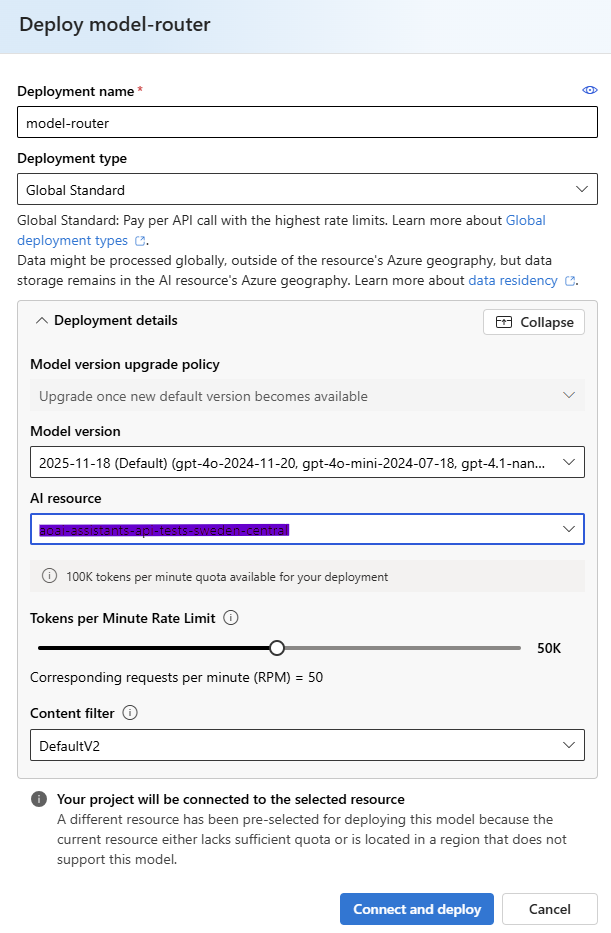
That’s it. The deployment comes pre-configured with every model in the routing pool and defaults to Balanced mode. You don’t get to pick which models are included or change the routing mode at deployment time. Those settings are baked into the model version.
One thing worth knowing: 2025-11-18 isn’t a fixed snapshot. Microsoft keeps adding models to it in place instead of shipping new version numbers. It held around 18 models when I wrote this in November 2025. By August 2026 the same version number covered 27.
The simplicity gets you started fast, but it means less control than I expected. We ended up creating multiple Model Router deployments on the same version for different use cases, even though the underlying configuration is identical. The real difference is in how we route queries to each deployment at the application layer.
For our production app, we use one Model Router deployment and handle the routing logic in code:
- General queries go straight to Model Router.
- Document analysis checks size first. Anything above roughly 20,000 estimated tokens goes to a static GPT-4.1 deployment instead, to sidestep context window issues.
- Creative content goes to a static GPT-4.1 deployment with a high temperature setting.
Once deployed, it shows up in Models + endpoints with status “Succeeded” and an expiration date, typically a year out.
The code: simpler than you’d think
Model Router uses the same SDK and the same API as any other Azure OpenAI deployment. Your code doesn’t change. You just point at a different deployment name.
Here’s the full implementation from our QueryService:
using Azure.AI.OpenAI;
using Azure.AI.OpenAI.Chat;

public class QueryService
{
    private readonly ChatClient _chatClient;
    private readonly TelemetryService _telemetry;

    public QueryService(AzureOpenAIClient client, string modelRouterDeployment, TelemetryService telemetry)
    {
        _chatClient = client.GetChatClient(modelRouterDeployment);
        _telemetry = telemetry;
    }

    public async Task<QueryResult> ProcessQueryAsync(string userQuery)
    {
        var startTime = DateTime.UtcNow;

        var messages = new List<ChatMessage>
        {
            new SystemChatMessage("You are a helpful AI assistant. Provide clear, concise answers."),
            new UserChatMessage(userQuery)
        };

        var options = new ChatCompletionOptions
        {
            MaxOutputTokenCount = 1000,
            Temperature = 0.7f
        };

        var completion = await _chatClient.CompleteChatAsync(messages, options);
        var duration = DateTime.UtcNow - startTime;

        var result = new QueryResult
        {
            Query = userQuery,
            Response = completion.Value.Content[0].Text,
            ModelUsed = completion.Value.Model,  // This tells you which model was selected
            InputTokens = completion.Value.Usage.InputTokenCount,
            OutputTokens = completion.Value.Usage.OutputTokenCount,
            Duration = duration,
            EstimatedCost = CalculateCost(completion.Value.Model,
                completion.Value.Usage.InputTokenCount,
                completion.Value.Usage.OutputTokenCount)
        };

        _telemetry.TrackQuery(result);
        return result;
    }
}The only thing different from a static GPT-4 deployment is the deployment name you pass to GetChatClient. The API and the response shape stay the same. So does the error handling.
The line that matters is ModelUsed = completion.Value.Model. That’s how you find out which model the router actually picked. We track it for every query. More on that below.
Configuration: user secrets over appsettings.json
We use .NET user secrets for local development and Azure Key Vault for production. Never commit API keys to source control, even in private repos. I’ve seen credentials leak from private repos more than once.
dotnet user-secrets set "AzureOpenAI:Endpoint" "https://your-resource.openai.azure.com/"
dotnet user-secrets set "AzureOpenAI:ApiKey" "your-api-key"
dotnet user-secrets set "AzureOpenAI:ModelRouterDeployment" "model-router-general"Production loads from Key Vault:
var config = new ConfigurationBuilder()
    .AddAzureKeyVault(new Uri(keyVaultUrl), new DefaultAzureCredential())
.Build();Since Model Router ships pre-configured with every model and Balanced routing, the decision about when to use it versus a static deployment happens at the application routing layer, not at the Model Router deployment itself.
Real query patterns: what actually routes where
I ran 10,000 queries through our test environment to see how routing actually behaves. The results were more nuanced than I expected.
Simple factual questions (“What’s the weather in London?”) route to GPT-4.1-nano about 85% of the time, and to GPT-4o-mini the other 15%. I never saw GPT-4.1 picked for these.
Information retrieval through Azure AI Search (“Find all documents about Q3 planning”) routes to GPT-4o-mini about 70% of the time, GPT-4.1 about 25%, and reasoning models (o4-mini) about 5%. That 5% surprised me. The router occasionally decides semantic search results need deeper reasoning.
Document analysis with code interpreter, Excel files and multi-sheet analysis, shows the most variety: about 35% GPT-4.1, 45% o4-mini, 20% GPT-5. The router seems to recognize numerical reasoning and data manipulation and leans hard on reasoning models for it.
Fabric data queries route to reasoning models 60% of the time. Unexpected at first, but it makes sense: users ask follow-up questions that build on previous answers, and that benefits from chain-of-thought reasoning.
Here’s the distribution from a week of production data, 42,000 queries:
- GPT-4.1-nano: 32% of queries, 8% of cost
- GPT-4o-mini: 28% of queries, 12% of cost
- GPT-4.1: 23% of queries, 35% of cost
- o4-mini: 12% of queries, 28% of cost
- GPT-5: 5% of queries, 17% of cost
60% of queries ran on the two cheapest models and accounted for 20% of cost. 5% of queries ran on GPT-5 and accounted for 17% of cost. That’s the savings mechanism in action: most traffic stays cheap, and the expensive models only turn on when a query actually needs them.
Telemetry: what to track and why
We track every query through Application Insights with custom metrics. Skip this and you’re flying blind on cost and behavior in production.
The telemetry service is intentionally simple:
public class TelemetryService
{
    private readonly TelemetryClient _telemetryClient;
    private readonly List<QueryResult> _queryResults = new();

    public void TrackQuery(QueryResult result)
    {
        // Store locally for in-memory summaries
        _queryResults.Add(result);

        // Send to Application Insights
        _telemetryClient.TrackEvent("QueryProcessed", new Dictionary<string, string>
        {
            ["ModelUsed"] = result.ModelUsed,
            ["QueryType"] = ClassifyQuery(result.Query)
        }, new Dictionary<string, double>
        {
            ["Cost"] = (double)result.EstimatedCost,
            ["Duration"] = result.Duration.TotalMilliseconds,
            ["InputTokens"] = result.InputTokens,
            ["OutputTokens"] = result.OutputTokens
        });
    }
}What we watch:
Model distribution. If half our queries suddenly route to GPT-5, something changed in user behavior or query patterns, and we need to know why.
Cost per query type. We bucket queries into categories (simple Q&A, document analysis, data queries, web search) and track average cost per bucket. This is how we spot a specific feature quietly driving costs up.
Routing consistency. Do similar queries land on the same model? About 80% of the time, yes. The other 20% sits on the boundary between complexity levels.
Latency by model. We track p50, p95, p99. o4-mini runs 3-4x slower than GPT-4o-mini for similar-length responses, because of chain-of-thought reasoning. That matters for anything user-facing.
The KQL query we run most in Application Insights:
customEvents
| where name == "QueryProcessed"
| extend Model = tostring(customDimensions.ModelUsed)
| extend Cost = todouble(customMetrics.Cost)
| summarize
    QueryCount = count(),
    TotalCost = sum(Cost),
    AvgCost = avg(Cost),
    P95Latency = percentile(todouble(customMetrics.Duration), 95)
  by Model
| order by TotalCost descThat gives us cost and performance broken down by model, in real time.
The context window problem: not theoretical
I flagged this in Part 1, but it deserves a closer look. It’s the biggest operational issue we’ve hit.
Model Router’s effective context window is the limit of the smallest model in its pool, and the smallest one matters here: GPT-4o-mini, at 128,000 tokens, sitting in the same pool as the GPT-4.1 family, which supports roughly 1 million.
We hit this in production. A user uploaded a 40-page contract for analysis. The router picked GPT-4.1, which handled it fine. Two minutes later, same user, same document, a follow-up question with more conversation history attached. This time the router picked GPT-4o-mini, and it failed immediately: “Context length exceeded.”
Same document, same use case, different model, and the user sees an error.
The problem: you can’t configure which models Model Router uses at the deployment level. It ships with the full pool, smaller-context models included.
Our fix: handle it at the application layer. For document analysis, we estimate token count before sending to Model Router. Above 20,000 tokens, we route to a static GPT-4.1 deployment instead.
public async Task<string> ProcessDocumentQuery(string query, List<Document> documents)
{
    var estimatedTokens = EstimateTokenCount(query, documents);

    if (estimatedTokens > 20000)
    {
        // Use static GPT-4.1 deployment for large documents
        return await ProcessWithStaticGPT4(query, documents);
    }

    // Use Model Router for smaller documents
    return await ProcessWithModelRouter(query, documents);
}It isn’t elegant. We’re running both Model Router and static deployments side by side. But it killed the intermittent failures completely.
The cost trade-off is real too. Large document queries, about 15% of our document analysis volume, cost roughly 40% more on static GPT-4.1 than they might have if Model Router had picked something cheaper. That’s a fair price for not failing at random.
Reasoning models and parameter handling
When Model Router picks a reasoning model (o4-mini, GPT-5), that model handles parameters differently than a standard chat model.
Temperature and top_p get ignored. Reasoning models use fixed parameters so their chain-of-thought process stays deterministic. Set temperature: 0.9 hoping for something creative, and if the router lands on o4-mini, you get consistent, less varied output regardless.
The 2025-11-18 version added the reasoning_effort parameter, which hands some of that control back. If the router selects a reasoning model, it passes your reasoning_effort value through to it. At the time, the documented values were low, medium, and high. Microsoft has since expanded that set to include none, minimal, and xhigh too, current as of August 2026.
Higher effort means more thorough reasoning, and also more latency and cost. Here’s how we set it:
var options = new ChatCompletionOptions
{
    MaxOutputTokenCount = 1000,
    Temperature = 0.7f  // Used if router selects standard models
};

// Add reasoning_effort for queries that might need deep analysis
if (queryRequiresDeepThinking)
{
    options.AdditionalProperties["reasoning_effort"] = "high";
}

var completion = await _chatClient.CompleteChatAsync(messages, options);We default to reasoning_effort: “medium” when users upload documents for analysis, bump to “high” for Fabric queries that need multiple calculations, and omit it entirely for simple queries.
The practical limit: you can’t force creative, high-temperature output when the router might land on a reasoning model. For anything where creativity matters, like brainstorming or drafting alternatives, we still route to a static GPT-4.1 deployment where temperature is ours to control.
That’s the trade you make with automated routing. Cost efficiency and reasoning capability when you need it, less fine-grained control over response style.
Error handling and fallbacks
Our strategy is simple: if Model Router fails, fall back to a static GPT-4.1 deployment.
public async Task<string> ProcessWithFallback(string query)
{
    try
    {
        return await ProcessWithModelRouter(query);
    }
    catch (RequestFailedException ex) when (ex.Status == 400)
    {
        // Context window exceeded or unsupported request
        _telemetry.TrackEvent("ModelRouterFallback", new Dictionary<string, string>
        {
            ["Reason"] = ex.Message
        });

        return await ProcessWithStaticGPT4(query);
    }
}We track fallback rate. Above 5% signals something wrong with the routing configuration.
In practice we run about 1-2%, almost entirely from context window issues despite the separate document router. Some users manage to upload files large enough to exceed even our large-context pool.
Cost calculation: the formula that actually works
Cost is more nuanced than it looks, because every model has its own input and output pricing, and the router itself adds a small charge on top.
Here’s the pricing logic we use, current as of November 2025:
private decimal CalculateCost(string model, int inputTokens, int outputTokens)
{
    // Pricing per 1M tokens
    var pricing = model.ToLowerInvariant() switch
    {
        var m when m.Contains("nano") => (Input: 0.15m, Output: 0.60m),
        var m when m.Contains("mini") => (Input: 0.30m, Output: 1.20m),
        var m when m.Contains("gpt-4.1") && !m.Contains("nano") && !m.Contains("mini")
            => (Input: 5.00m, Output: 15.00m),
        var m when m.Contains("gpt-5") => (Input: 10.00m, Output: 30.00m),
        var m when m.Contains("o4-mini") => (Input: 3.00m, Output: 15.00m),
        _ => (Input: 5.00m, Output: 15.00m) // Default to GPT-4.1 pricing
    };

    // Router overhead (approximately $0.10 per 1M input tokens)
    var routerCost = (inputTokens / 1_000_000m) * 0.10m;

    var inputCost = (inputTokens / 1_000_000m) * pricing.Input;
    var outputCost = (outputTokens / 1_000_000m) * pricing.Output;

    return routerCost + inputCost + outputCost;
}he router overhead is small but real. At our volume (140,000+ queries a month) it adds about $45 a month. Against $3,900 a month in savings, that’s noise.
Azure’s pricing moves. These numbers were accurate when I wrote this. Check the pricing page before you build them into a production cost model.
What we got wrong initially
Mistake 1: we sent everything to Model Router, including large document uploads. The context window failures forced us to add application-layer logic to catch large documents and route them to static deployments. We should have built that check on day one.
Mistake 2: we assumed routing was deterministic. It isn’t. Similar queries can land on different models, especially near the complexity boundary. We redesigned the UI around that: never promise a user specific model behavior.
Mistake 3: I expected to customize routing mode or model subset at deployment time. The 2025-11-18 version ships pre-configured, and you can’t change those settings there. Fine-grained control has to happen at the application layer.
Mistake 4: for the first two weeks, we didn’t log which model got selected for each query. Debugging was close to impossible. We track everything now.
The Agent Service integration gap
Microsoft announced Model Router integration with Agent Service in November 2025. When I first tried using Model Router as an agent’s base model, it didn’t work:
Azure.RequestFailedException: ‘The requested model ‘model_router’ is not supported. Status: 400 (Bad Request) ErrorCode: unsupported_model
The UI didn’t show Model Router in the agent deployment dropdown, and the SDK rejected it outright. Standard for an Azure preview feature: the announcement lands before the capability does.
At the time, we kept static model deployments for multi-tool scenarios (code interpreter, Azure AI Search, Bing grounding) and let Model Router handle the simpler, high-volume chat queries separately.
Update: this is fixed now. Foundry Agent Service officially supports model router as an agent’s base model, with per-turn routing across tool-calling, RAG, and multi-turn scenarios, current as of August 2026. If you hit the error above, it’s worth revisiting with a current SDK version rather than assuming it’s still broken.
When to stick with static deployments
We still use static deployments for:
Highly regulated content, where compliance needs exact model versioning and reproducibility. Model Router can’t guarantee which model version gets used.
Sub-500ms latency requirements. In our testing, Model Router added roughly 50-100ms per request for the routing decision, so our fastest user-facing features run on static GPT-4o-mini deployments instead.
Creative content generation, where we need high temperature and consistent creative behavior.
Debugging, where reproducing an issue exactly matters more than saving a few cents.
Model Router is the right default for most workloads, but not all of them. About 75% of our query volume runs through Model Router. The other 25% is on static deployments, and for good reason.
The net effect
Deployment is simpler than I expected, which shifts the real work onto application-layer logic for edge cases the portal doesn’t let you configure away.
The cost savings hold up: 55% versus static GPT-4, but only because we put real time into telemetry. Without visibility into which models get picked and why, the savings stay theoretical.
The context window limit was the expensive lesson. We lost hours to intermittent failures before realizing Model Router occasionally routes a large document to a smaller-context model. Token estimation at the application layer fixed it, and none of this is obvious from the documentation.
Documentation lags reality, and not just on the Agent Service integration. That’s normal for a fast-moving Azure service. Production experience beats the docs most weeks.
The complete demo application, everything in this post, is on GitHub. Clone it, drop in your Azure OpenAI credentials, and run it. It processes 10 queries across different complexity levels and shows you exactly which models get picked and why.
