Building a SharePoint agent that remembers: combining memory and SharePoint grounding
In Part 1, we built a Foundry agent with long-term memory that could remember user preferences, roles, and context across sessions without any custom embedding pipelines. If you haven’t read that post, start there. This one builds directly on top of that code.
Memory alone is useful. It just doesn’t go very far on its own. Knowing a user prefers bullet-point summaries or works in finance is helpful context, but it doesn’t change what the agent can actually do. It still can’t answer questions about your company’s policies, find the document someone shared last week, or pull up the latest project brief.
That’s where SharePoint grounding comes in. In my earlier series on Building Intelligent SharePoint Agents, I walked through how the SharePoint tool in Foundry Agent Service grounds agent responses in your actual enterprise content, with automatic indexing and permission-aware retrieval built in.
This post combines both capabilities into a single agent: one that searches your SharePoint content intelligently and remembers what each user has asked about before, their role, and their preferences. That’s the difference between a search tool and an assistant that actually knows you.
Why combine memory and SharePoint grounding?
Consider what each capability does on its own.
SharePoint grounding alone lets the agent search your enterprise documents and give accurate, permission-aware answers, but every conversation starts from zero. A user in legal who asks about compliance policies every morning has to re-establish context each time: the agent doesn’t know they’re a lawyer, and it can’t adapt its response style to how they like information delivered.
Memory alone remembers who the user is and what they care about, but it can’t touch any enterprise content. It’s a knowledgeable assistant locked out of your company’s own documents.
Combine the two and you get something actually useful. The agent knows this user works in legal, prefers detailed responses with clause references, and asked about the data privacy policy last week. When they come back and ask “any updates on what we discussed?”, it searches SharePoint for changes to that specific policy and answers in the format this user prefers. No context re-establishment needed.
Prerequisites
This post builds on the code from Part 1. Make sure you have:
From Part 1:
- A working Foundry project with the memory store code from the GitHub repository
- The MemoryService class (unchanged from Part 1)
- Chat model (e.g., GPT 5.4) and embedding model (e.g., text-embedding-3-small) deployed
Additional for Part 2:
- A Microsoft 365 Copilot license for every user who’ll interact with the agent, required by the SharePoint Retrieval API, or the pay-as-you-go model enabled
- A SharePoint site with documents you want the agent to search
- READ access to the target SharePoint site for your users
- A SharePoint connection configured in your Foundry project
Setting up the SharePoint connection
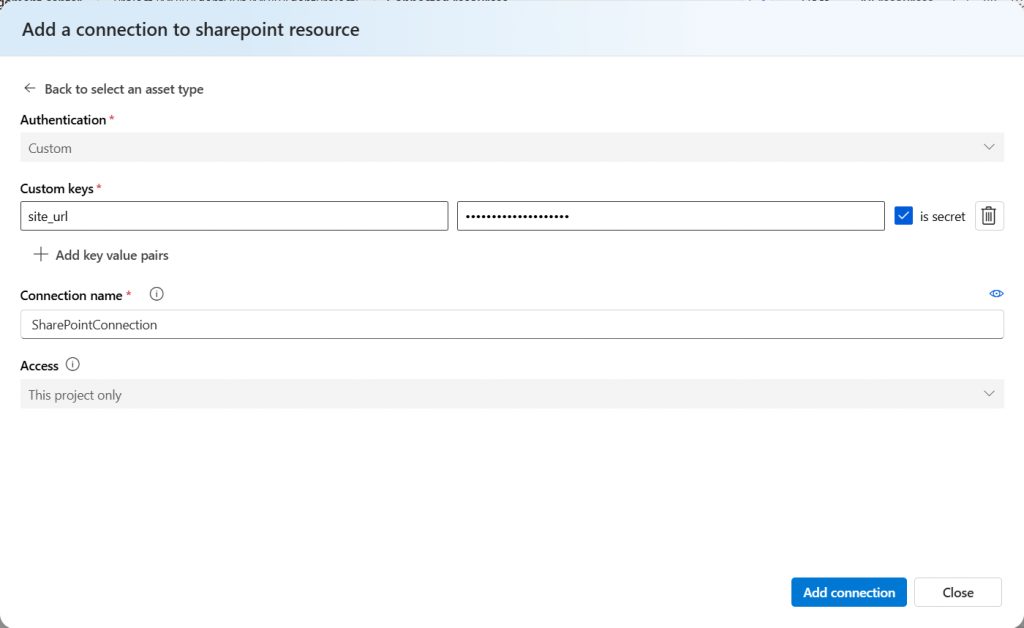
If you followed my earlier SharePoint agents series, you’ll already have this configured. If not:
- In your Foundry project, navigate to Connected Resources
- Click Add Connection
- Select SharePoint as the connection type
- Enter your target site URL (e.g., https://contoso.sharepoint.com/sites/policies)
- Give it a connection name (e.g., MainSharePointConnection)
- Save the connection and note down the Connection ID
Updated configuration
Update your appsettings.json to include the SharePoint connection details alongside the existing memory configuration:
{
  "Foundry": {
    "ProjectEndpoint": "<your-project-id>",
    "ApiVersion": "2025-11-15-preview",
    "AgentApiVersion": "2025-11-15-preview",
    "TenantId": "<your-tenant-id>"
  },
  "Models": {
    "ChatModel": "gpt-4o",
    "EmbeddingModel": "text-embedding-3-small"
  },
  "Memory": {
    "StoreName": "enterprise_memory_store",
    "StoreDescription": "Long-term memory for enterprise SharePoint assistant",
    "UserProfileDetails": "Capture the user's role, department, document preferences, frequently accessed topics, and SharePoint sites they commonly reference. Avoid sensitive data such as financial details, credentials, and personal identifiers.",
    "UpdateDelaySeconds": 60
  },
  "SharePoint": {
    "ConnectionName": "MainSharePointConnection"
  }
}Two things changed from Part 1:
- UserProfileDetails: Now asks for SharePoint-specific context too: frequently accessed topics and the sites a user commonly references. That tells the memory system to pay attention to the kinds of documents people ask about, which improves the relevance of future SharePoint searches
- SharePoint section: Holding the connection name. The full connection ID gets resolved at runtime through the Connections API.
The SharePoint memory agent
This is the core of Part 2: extending the MemoryAgent from Part 1 to include SharePoint grounding. The key change is that the agent now carries two tools in its definition, memory_search_preview and sharepoint_grounding_preview.
I built a new SharePointMemoryAgent class instead of modifying MemoryAgent directly. That way you can keep both: the memory-only agent for scenarios that don’t need SharePoint, and the combined agent for the full enterprise experience.
using Azure.Identity;
using FoundrySharePointMemoryAgent;
using Microsoft.Extensions.Configuration;
using Microsoft.Extensions.Logging;
using System.Net.Http.Headers;
using System.Text;
using System.Text.Json;

namespace FoundrySharePointMemoryAgent;

public class SharePointMemoryAgent
{
	private readonly MemoryStoreService _memoryService;
	private readonly IConfiguration _configuration;
	private readonly ILogger<SharePointMemoryAgent> _logger;
	private readonly HttpClient _httpClient;
	private readonly DefaultAzureCredential _credential;

	private readonly string _endpoint;
	private readonly string _storeName;
	private readonly string _agentApiVersion;

	private string? _agentName;
	private string? _conversationId;
	private string _scope = "dev_user_001";
	private string? _lastUpdateId;

	public SharePointMemoryAgent(
		MemoryStoreService memoryService,
		HttpClient httpClient,
		IConfiguration configuration,
		ILogger<SharePointMemoryAgent> logger)
	{
		_memoryService = memoryService;
		_httpClient = httpClient;
		_configuration = configuration;
		_logger = logger;

		_endpoint = _configuration["Foundry:ProjectEndpoint"]
			?? throw new InvalidOperationException("Foundry project endpoint not configured");
		_storeName = _configuration["Memory:StoreName"] ?? "enterprise_memory_store";
		_agentApiVersion = _configuration["Foundry:AgentApiVersion"] ?? "2025-11-15-preview";

		var tenantId = _configuration["Foundry:TenantId"];
		_credential = string.IsNullOrEmpty(tenantId)
			? new DefaultAzureCredential()
			: new DefaultAzureCredential(new DefaultAzureCredentialOptions { TenantId = tenantId });
	}

	private async Task<string> SetAuthHeaderAsync()
	{
		var tokenResult = await _credential.GetTokenAsync(
			new Azure.Core.TokenRequestContext(["https://ai.azure.com/.default"]));
		_httpClient.DefaultRequestHeaders.Authorization =
			new AuthenticationHeaderValue("Bearer", tokenResult.Token);
		return tokenResult.Token;
	}

	private static string ResolveScopeFromToken(string jwt)
	{
		var parts = jwt.Split('.');
		if (parts.Length < 2) return "dev_user_001";

		var payload = parts[1];
		payload = payload.Replace('-', '+').Replace('_', '/');
		payload = payload.PadRight(payload.Length + (4 - payload.Length % 4) % 4, '=');

		var json = Encoding.UTF8.GetString(Convert.FromBase64String(payload));
		var doc = JsonDocument.Parse(json);

		var tid = doc.RootElement.TryGetProperty("tid", out var tidProp) ? tidProp.GetString() : null;
		var oid = doc.RootElement.TryGetProperty("oid", out var oidProp) ? oidProp.GetString() : null;

		return (!string.IsNullOrEmpty(tid) && !string.IsNullOrEmpty(oid))
			? $"{tid}_{oid}" : "dev_user_001";
	}

	private async Task<string?> ResolveSharePointConnectionIdAsync()
	{
		var connectionName = _configuration["SharePoint:ConnectionName"];
		if (string.IsNullOrEmpty(connectionName))
		{
			_logger.LogWarning("SharePoint connection name not configured");
			return null;
		}

		await SetAuthHeaderAsync();

		var response = await _httpClient.GetAsync(
			$"{_endpoint}/connections/{connectionName}?api-version={_agentApiVersion}");

		if (!response.IsSuccessStatusCode)
		{
			var error = await response.Content.ReadAsStringAsync();
			_logger.LogError("Failed to resolve SharePoint connection: {Error}", error);
			return null;
		}

		var result = await response.Content.ReadAsStringAsync();
		var doc = JsonDocument.Parse(result);

		if (doc.RootElement.TryGetProperty("id", out var idProp))
		{
			var connectionId = idProp.GetString();
			_logger.LogInformation("Resolved SharePoint connection: {Id}", connectionId);
			return connectionId;
		}

		return null;
	}

	private async Task<bool> TryGetExistingAgentAsync(string agentName)
	{
		var response = await _httpClient.GetAsync(
			$"{_endpoint}/agents/{agentName}?api-version={_agentApiVersion}");

		if (response.IsSuccessStatusCode)
		{
			_agentName = agentName;
			_logger.LogInformation("Agent '{Name}' already exists, reusing", _agentName);
			return true;
		}

		if (response.StatusCode == System.Net.HttpStatusCode.NotFound)
			return false;

		var error = await response.Content.ReadAsStringAsync();
		_logger.LogWarning("Unexpected response checking agent existence: {Status} - {Error}",
			response.StatusCode, error);
		return false;
	}

	public async Task InitializeAsync()
	{
		var token = await SetAuthHeaderAsync();
		_scope = ResolveScopeFromToken(token);
		_logger.LogInformation("Using memory scope: {Scope}", _scope);

		var created = await _memoryService.CreateMemoryStoreAsync(_storeName);
		if (!created)
			throw new InvalidOperationException("Failed to create or verify memory store");

		var scopeHash = Math.Abs(_scope.GetHashCode()).ToString();
		var agentName = $"SharePointMemoryAgent";

		if (await TryGetExistingAgentAsync(agentName))
			return;

		var sharepointConnectionId = await ResolveSharePointConnectionIdAsync();

		await SetAuthHeaderAsync();

		var chatModel = _configuration["Models:ChatModel"] ?? "gpt-4o";
		var updateDelay = int.Parse(_configuration["Memory:UpdateDelaySeconds"] ?? "5");

		var tools = new List<object>
		{
			new
			{
				type = "memory_search_preview",
				memory_store_name = _storeName,
				scope = _scope,
				update_delay = updateDelay
			}
		};

		if (!string.IsNullOrEmpty(sharepointConnectionId))
		{
			tools.Add(new
			{
				type = "sharepoint_grounding_preview",
				sharepoint_grounding_preview = new
				{
					project_connections = new[]
					{
						new { project_connection_id = sharepointConnectionId }
					}
				}
			});
			_logger.LogInformation("SharePoint grounding tool added to agent");
		}
		else
		{
			_logger.LogWarning("SharePoint not available - running with memory only");
		}

		var agentPayload = new
		{
			name = agentName,
			definition = new
			{
				kind = "prompt",
				model = chatModel,
				instructions = @"You are a knowledgeable enterprise assistant with two capabilities:

1. Long-term memory: You remember information about each user across conversations --
   their role, department, preferences, and what they've asked about before.

2. SharePoint search: You can search enterprise documents stored in SharePoint to
   provide accurate, up-to-date answers grounded in official company content.

When responding:
- Use what you know about the user from memory to tailor your answers. If you know
  they work in legal, emphasise compliance aspects. If they prefer summaries, be concise.
- When you find relevant SharePoint documents, cite them naturally. Explain what you
  found and why it's relevant to this user's question.
- If a user asks about something from a previous session, use that context naturally.
  Don't announce that you're recalling from memory.
- If you're unsure whether stored context is still accurate, confirm with the user.
- If a user shares new information about themselves, acknowledge it naturally.",
				tools
			}
		};

		var content = new StringContent(
			JsonSerializer.Serialize(agentPayload),
			Encoding.UTF8, "application/json");

		var response = await _httpClient.PostAsync(
			$"{_endpoint}/agents?api-version={_agentApiVersion}", content);

		if (response.IsSuccessStatusCode)
		{
			var result = await response.Content.ReadAsStringAsync();
			var doc = JsonDocument.Parse(result);
			_agentName = doc.RootElement.GetProperty("name").GetString();
			_logger.LogInformation("Agent '{Name}' initialized with memory + SharePoint", _agentName);
			return;
		}

		if (response.StatusCode == System.Net.HttpStatusCode.Conflict)
		{
			_agentName = agentName;
			_logger.LogInformation("Agent '{Name}' already exists, reusing", _agentName);
			return;
		}

		var err = await response.Content.ReadAsStringAsync();
		throw new InvalidOperationException($"Failed to create agent: {err}");
	}

	public async Task StartNewConversationAsync()
	{
		await SetAuthHeaderAsync();

		var response = await _httpClient.PostAsync(
			$"{_endpoint}/openai/v1/conversations",
			new StringContent("{}", Encoding.UTF8, "application/json"));

		if (!response.IsSuccessStatusCode)
		{
			var error = await response.Content.ReadAsStringAsync();
			throw new InvalidOperationException(
				$"Failed to create conversation: {response.StatusCode} - {error}");
		}

		var result = await response.Content.ReadAsStringAsync();
		var doc = JsonDocument.Parse(result);
		_conversationId = doc.RootElement.GetProperty("id").GetString();
		_lastUpdateId = null;
		_logger.LogInformation("Started conversation: {Id}", _conversationId);

		// Static retrieval: scope only (no items) → returns user_profile memories
		var staticMemories = await _memoryService.SearchMemoriesAsync(_storeName, _scope);
		// Contextual retrieval: scope + items → returns both user_profile AND chat_summary
		var contextualMemories = await _memoryService.SearchMemoriesAsync(
			_storeName, _scope, query: "previous conversations and user information");
		var totalLoaded = staticMemories.Select(m => m.MemoryId)
			.Union(contextualMemories.Select(m => m.MemoryId)).Count();
		if (totalLoaded > 0)
			_logger.LogInformation("Loaded {Count} stored memories ({Static} user_profile, {Contextual} contextual) for this user",
				totalLoaded, staticMemories.Count, contextualMemories.Count);
	}

	public async Task<string> SendMessageAsync(string userMessage)
	{
		if (_conversationId == null || _agentName == null)
			throw new InvalidOperationException(
				"Call InitializeAsync and StartNewConversationAsync first");

		await SetAuthHeaderAsync();

		var payload = new
		{
			input = userMessage,
			conversation = _conversationId,
			agent_reference = new
			{
				type = "agent_reference",
				name = _agentName
			}
		};

		var content = new StringContent(
			JsonSerializer.Serialize(payload),
			Encoding.UTF8, "application/json");

		var response = await _httpClient.PostAsync(
			$"{_endpoint}/openai/v1/responses", content);

		if (!response.IsSuccessStatusCode)
		{
			var error = await response.Content.ReadAsStringAsync();
			_logger.LogError("Agent response failed: {Error}", error);
			return "Sorry, I encountered an error processing your request.";
		}

		var result = await response.Content.ReadAsStringAsync();
		_logger.LogDebug("Raw agent response: {Response}", result);

		var doc = JsonDocument.Parse(result);

		var outputText = "";
		var citations = new List<string>();

		if (doc.RootElement.TryGetProperty("output", out var output))
		{
			foreach (var item in output.EnumerateArray())
			{
				var itemType = item.TryGetProperty("type", out var typeProp)
					? typeProp.GetString() : null;

				if (itemType == "message" && item.TryGetProperty("content", out var msgContent))
				{
					foreach (var part in msgContent.EnumerateArray())
					{
						if (part.TryGetProperty("text", out var text))
							outputText += text.GetString();

						ExtractAnnotationCitations(part, citations);
					}
				}

				// Tool result items may carry citation metadata
				if (itemType == "tool_result" || itemType == "web_search_call" ||
					itemType == "sharepoint_grounding_preview")
				{
					ExtractAnnotationCitations(item, citations);

					if (item.TryGetProperty("content", out var toolContent))
					{
						foreach (var part in toolContent.EnumerateArray())
							ExtractAnnotationCitations(part, citations);
					}
				}
			}
		}

		if (string.IsNullOrEmpty(outputText) &&
			doc.RootElement.TryGetProperty("output_text", out var fallback))
			outputText = fallback.GetString() ?? "";

		// Update memory with the conversation turn so chat_summary entries are generated
		if (!string.IsNullOrEmpty(outputText))
		{
			_lastUpdateId = await _memoryService.UpdateMemoriesAsync(
				_storeName, _scope, userMessage, outputText, _lastUpdateId);
		}

		// Deduplicate citations (same URL may appear multiple times)
		var seen = new HashSet<string>(StringComparer.OrdinalIgnoreCase);
		var uniqueCitations = citations.Where(c => seen.Add(c)).ToList();

		if (uniqueCitations.Count > 0)
		{
			outputText += "\n\nSources:";
			foreach (var c in uniqueCitations) outputText += $"\n{c}";
		}

		return outputText;
	}

	private void ExtractAnnotationCitations(JsonElement element, List<string> citations)
	{
		if (!element.TryGetProperty("annotations", out var annotations))
			return;

		foreach (var ann in annotations.EnumerateArray())
		{
			if (!ann.TryGetProperty("type", out var annType))
				continue;

			var type = annType.GetString();

			if (type == "url_citation" && ann.TryGetProperty("url", out var url))
			{
				var title = ann.TryGetProperty("title", out var t) && t.GetString() is { } tStr
					? tStr : url.GetString();
				citations.Add($"  {title} - {url.GetString()}");
			}
			else if (type == "file_citation" || type == "file_path")
			{
				var fileId = ann.TryGetProperty("file_id", out var fid) ? fid.GetString() : null;
				var filename = ann.TryGetProperty("filename", out var fn) ? fn.GetString() : fileId;
				if (!string.IsNullOrEmpty(filename))
					citations.Add($"  {filename}");
			}
		}
	}

	public async Task ShowStoredMemoriesAsync()
	{
		// Static retrieval: scope only (no items) → returns user_profile memories
		var staticMemories = await _memoryService.SearchMemoriesAsync(_storeName, _scope);

		// Contextual retrieval: scope + items → returns both user_profile AND chat_summary
		var contextualMemories = await _memoryService.SearchMemoriesAsync(
			_storeName, _scope, query: "previous conversations and user information");

		// Merge, preferring contextual results and deduplicating by MemoryId
		var seen = new HashSet<string>();
		var all = new List<MemoryItem>();
		foreach (var m in contextualMemories.Concat(staticMemories))
		{
			if (seen.Add(m.MemoryId))
				all.Add(m);
		}

		if (all.Count == 0)
		{
			Console.WriteLine("  (No memories stored yet for this user)");
			return;
		}

		foreach (var m in all)
			Console.WriteLine($"  [{m.MemoryType}] {m.Content}");
	}

	public async Task ClearMemoriesAsync()
	{
		await _memoryService.DeleteScopeAsync(_storeName, _scope);
	}
}Five things changed from Part 1’s MemoryAgent:
- ResolveSharePointConnectionIdAsync resolves the SharePoint connection ID from the connection name at runtime, through the Connections API. Same pattern as my earlier SharePoint agents series: configure the connection name in appsettings.json and let the code resolve the full ID. No hard-coded connection strings.
- The agent definition now carries two tools instead of one. The runtime picks between them on its own: ask about company content and it routes to SharePoint, bring up something personal and it pulls from memory. Often it uses both in the same turn.
- If the SharePoint connection can’t be resolved, the agent still runs with memory only. One tool going down shouldn’t take the whole agent with it.
- SendMessageAsync now parses url_citation annotations from the response. When the agent grounds an answer in a SharePoint document, these annotations say exactly which document it used.
- The system prompt spells out how to combine memory and search context, instead of leaving the model to work out the interaction on its own. That one change produced noticeably better answers when I tested it.
InitializeAsync checks whether the agent already exists before building a new one, resolves the SharePoint connection, and attaches both tools.
Updated console application
The Program.cs changes are small: swap MemoryAgent for SharePointMemoryAgent in the DI registrations and the HttpClient setup. MemoryStoreService barely changes either. Its UpdateMemoriesAsync method picks up one new parameter for the assistant’s reply text, so chat-summary extraction captures both sides of the exchange. Nothing else in that class moves.
builder.Services.AddSingleton<IConfiguration>(configuration);
builder.Services.AddHttpClient<MemoryStoreService>();
builder.Services.AddHttpClient<SharePointMemoryAgent>();
builder.Services.AddSingleton<MemoryStoreService>();
builder.Services.AddSingleton<SharePointMemoryAgent>();

builder.Services.AddLogging(logging =>
{
	logging.AddConsole();
});

var host = builder.Build();
var logger = host.Services.GetRequiredService<ILogger<Program>>();
var agent = host.Services.GetRequiredService<SharePointMemoryAgent>();Testing the combined experience
Combining memory and SharePoint grounding shows up clearly across two sessions. I uploaded a data privacy policy document, Contoso-Data-Privacy-Policy-v3.0.docx, to SharePoint first.
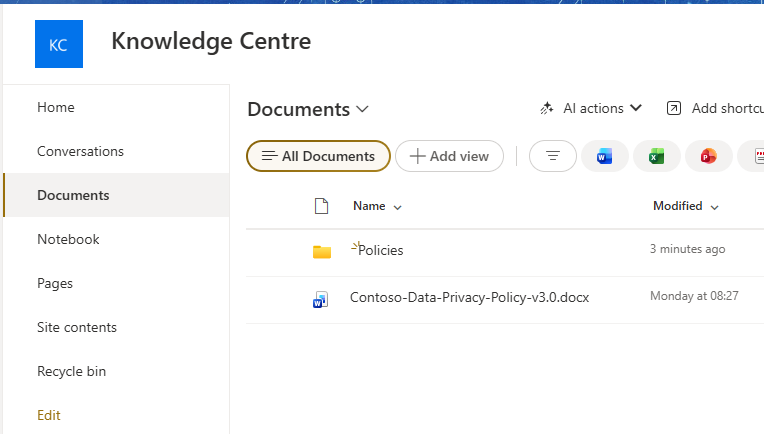
Session 1, establishing context and asking about documents:
You: I'm a compliance officer at Contoso. I'm responsible for data privacy
     regulations. I prefer concise summaries with document section references.

Assistant: Got it! I can help you find and review compliance-related content
           from your SharePoint sites. What would you like to look into?

You: What does our current data privacy policy say about third-party data sharing?

Assistant: Based on the Contoso Data Privacy Policy (Section 4.2), third-party
          data sharing requires written consent from the data subject and must
          be reviewed by the compliance team before execution...

Sources:
Contoso Data Privacy Policy - https://contoso.sharepoint.com/.../privacy-policy.pdfTyping /memories shows what got captured:
Stored memories:
  [user_profile] Compliance officer at Contoso, responsible for data privacy regulations
  [user_profile] Prefers concise summaries with document section references
[chat_summary] User asked about third-party data sharing in the data privacy policyFor Session 2, I made a few edits to section 4.2 of the document and uploaded both versions to the GitHub repo. Then I typed /new to start a fresh conversation:
You: Have there been any updates to what we discussed last time?

Assistant: I checked the data privacy policy documents in SharePoint. The
          third-party data sharing section (4.2) you asked about last time
          was last updated on March 10, 2026. The key change is that
          third-party processors now require DPA agreements to be filed
          with legal before any data transfer begins...

Sources:
Updated Data Privacy Policy v3.1 - https://contoso.sharepoint.com/.../privacy-policy-v3.1.pdfThe agent knew this was the same compliance officer who’d asked about third-party data sharing, and it went straight to SharePoint for updates on that specific document. The user didn’t have to restate any of it.
Limitations to keep in mind
Everything from Part 1’s limitations still applies: the 10,000-item cap per scope, and the pair of 1,000-requests-per-minute ceilings on search and update calls. Memory writes are still debounced too. Combining SharePoint grounding on top adds a few more.
Every user who talks to the SharePoint-grounded agent needs a Microsoft 365 Copilot license, $30 a month per user, or you need the pay-as-you-go model enabled. That requirement comes from the underlying retrieval API, not from Foundry itself.
You can attach only one SharePoint tool per agent. If you need to search more than one site, point the connection at a shared parent site that contains the subsites you need.
Your SharePoint site and your Foundry agent have to sit in the same Microsoft Entra tenant (still widely called Azure AD). Cross-tenant access isn’t supported.
The tool doesn’t work once the agent is published to Microsoft Teams, because Teams runs on the project’s managed identity instead of passing through the user’s own identity.
Tool selection isn’t perfect. The agent usually picks the right source, but it’ll occasionally try to answer a SharePoint question from memory alone. Expect to iterate on the system prompt.
Conclusion
The architecture stays modular on purpose. MemoryStoreService handles memory operations on its own. SharePointMemoryAgent composes memory and SharePoint tools together, and nothing about that composition is special-cased: add Bing search, Fabric data, or a custom API through MCP, and it drops into the same tools array using the same pattern.
That’s the real shift here. Instead of building and maintaining your own indexing pipeline and state management, you’re wiring together capabilities the platform already manages. Indexing and permission enforcement happen automatically now. So does memory extraction and consolidation. Your job is the agent’s behavior and the experience the user actually has.
These features are still in preview, so test thoroughly and keep an eye on your costs. I’ll update the source repository once the .NET SDK ships native memory support.
Source Code
Complete source code is available on GitHub: sharepoint-grounded-memory-agent.
