Beyond Stateless Conversations: Adding Long-Term Memory to Your Foundry Agents
If you’ve worked with AI agents in production, you’ve almost certainly run into this problem: a user tells your agent something important in one session, and the next time they come back, the agent has completely forgotten about it. The user has to repeat themselves. Context is lost. The experience feels disjointed.
I ran into this exact issue on a project where users interacted with an enterprise agent multiple times a day. They’d establish context in the morning (their role, the documents they cared about, the summary format they preferred), then come back after lunch to find the agent remembered none of it.
We built a workaround: stuff conversation history into prompts, maintain our own embedding store. It worked, but it cost us in latency and in code that had nothing to do with the actual business logic.
When Microsoft announced the public preview of Memory in Foundry Agent Service at Ignite 2025, I paid attention. The concept of agent memory isn’t new; we’ve all built our own versions of it by hand. What got me was the promise that the platform would handle the plumbing itself: no custom embedding databases, no retrieval pipelines, no manual consolidation logic.
If you’ve read my previous posts on Bing Search agents, SharePoint grounding, and delegated permissions, you know I like to get hands-on and see what actually works. When I wrote this, Foundry’s own memory documentation covered Python and REST only, so that’s the gap this post fills for .NET.
The problem with stateless agents
Most agents built on large language models are stateless by design. Each conversation starts fresh. The model gets a prompt, generates a response, and moves on. There’s no built-in mechanism to carry information from one session to the next.
Developers have tried a few workarounds:
- Conversation history injection: loading previous turns into the system prompt or message history. Works for short-term context, but it eats your token budget fast as conversations grow, and it isn’t selective. You’re injecting everything, not just what’s relevant.
- Custom vector stores: extracting key information from conversations, embedding it, and storing it in something like Azure AI Search or a dedicated vector database. This gets you semantic retrieval, but you own the entire pipeline: extraction logic, embedding management, index maintenance, and conflict resolution when facts change.
- Database-backed state: storing structured user preferences in a traditional database and injecting them into prompts. Simple and effective for known attributes, but it doesn’t scale to unstructured or evolving information.
Each approach works to a point, but they share the same problem: you end up spending real development effort on infrastructure that isn’t your product. You’re maintaining a memory system instead of the agent behavior your users actually care about.aintaining a memory system instead of focusing on the agent behaviour that actually matters to your users.
How Foundry Agent Memory works
Memory in Foundry Agent Service is a managed, long-term memory store built into the agent runtime. Instead of building and maintaining the extraction and retrieval pipeline yourself, the service handles it.
The process runs in 4 phases:
- Extract: as the user interacts with the agent, the system pulls out key information: preferences, facts, and context likely to matter in future sessions. If a user mentions they work in finance and prefer bullet-point summaries, the system captures that.
- Consolidate: extracted memories get merged and deduplicated. If a user said they prefer dark roast coffee and later mentions switching to light roast, an LLM resolves the conflict and updates the memory instead of storing both.
- Retrieve: at the start of each new conversation, hybrid search surfaces relevant memories. Core profile facts (role, restrictions) get injected immediately; contextual memories are retrieved per turn based on the latest messages.
- Customize: the user_profile_details parameter tells the system what kind of information matters for your use case. A travel agent might prioritize airline preferences and dietary restrictions. A developer support agent might care more about programming languages and framework versions.
Memory types
The system supports two types of memory.
User profile memory holds durable facts about the user, like their preferences and role, plus any standing restrictions. It’s retrieved at the start of every conversation, regardless of what the user asks.
Chat summary memory holds condensed summaries of previous conversations. It gives the agent contextual continuity: it can reference what was discussed last time without replaying the entire history.
Update: Microsoft has since added a third type, procedural memory, for reusable how-to routines the agent infers from prior interactions. It wasn’t available when this post went up.
Scoping and isolation
Memory is partitioned by the scope parameter. Each scope keeps its own isolated collection of memory items. In most scenarios you’d scope memory to individual users: their Entra ID, a UUID, or {{$userId}}, which automatically extracts the tenant and object ID from the authentication header.
This matters in enterprise scenarios, where one user’s memory absolutely cannot leak into another’s conversation. Each scope is a fully separate partition.
Prerequisites
Before we start coding, make sure you have the following in place:
Azure Requirements
- An Azure subscription with access to Microsoft Foundry
- A Microsoft Foundry project. If you haven’t set one up, see Step 1 in my earlier post on Bing Search agents
- The Foundry User RBAC role assigned to your identity (Microsoft renamed this from Azure AI User after this post first went up; the role ID and permissions didn’t change)
Model Deployments
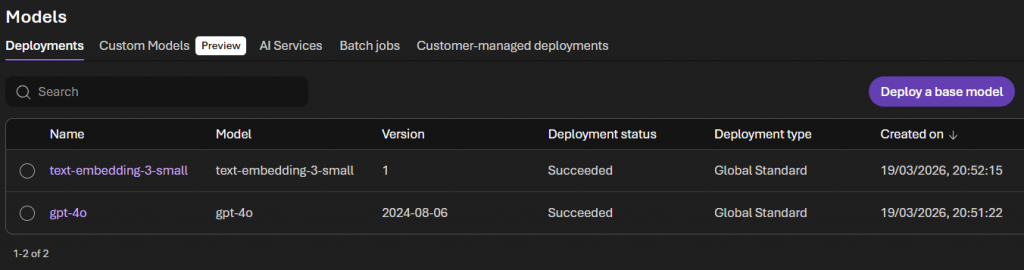
You’ll need 2 model deployments in your Foundry project:
- A chat model, such as gpt-4o or gpt-5.2, that handles memory extraction and consolidation
- An embedding model, such as text-embedding-3-small, that powers semantic search when retrieving memories
Deploy both from your Foundry project’s “Models + Endpoints” section, and note the deployment names.
Development Environment
You will need:
- .NET 8.0 or later
- Visual Studio 2022 (or later) or VS Code
A note on the SDK
As of March 2026, when I wrote this, the Foundry Agent Service memory feature was in public preview and the .NET SDK (Azure.AI.Projects 2.0.0-beta.1) hadn’t caught up. The Python SDK already had first-class support through project_client.beta.memory_stores, and the REST API was fully documented.
So this post wraps the REST API in a clean .NET service class. That’s the approach I’d recommend for any preview feature anyway: it gives you full control and it’s easy to debug. You can swap in the SDK once it catches up, without changing your application code.
Update: Microsoft has since shipped native C# support: Azure.AI.Projects and Azure.AI.Projects.Agents, both around version 2.1.0-beta.4 as of this update, with a MemorySearchPreviewTool and a MemoryStores client that cover most of what this post builds by hand below. If you’re starting a new project today, check the current Create and use memory guide before you write your own HttpClient wrapper. The walkthrough below still works, and the mechanics haven’t changed, but you don’t have to build it yourself anymore.
Project setup
Create a new .NET console application, or add to an existing agent project. You’ll need these packages:
<PackageReference Include="Azure.Identity" Version="1.13.2" />
<PackageReference Include="Microsoft.Extensions.Configuration" Version="10.0.5" />
<PackageReference Include="Microsoft.Extensions.Configuration.Json" Version="10.0.5" />
<PackageReference Include="Microsoft.Extensions.DependencyInjection" Version="10.0.5" />
<PackageReference Include="Microsoft.Extensions.Hosting" Version="10.0.5" />
<PackageReference Include="Microsoft.Extensions.Http" Version="10.0.5" />
<PackageReference Include="Microsoft.Extensions.Logging" Version="10.0.5" />
<PackageReference Include="Microsoft.Extensions.Logging.Console" Version="10.0.5" />Configuration
Update your appsettings.json:
{
  "Foundry": {
    "ProjectEndpoint": "https://{your-ai-services-account}.services.ai.azure.com/api/projects/{project-name}",
    "ApiVersion": "2025-11-15-preview",
    "AgentApiVersion": "2025-11-15-preview",
    "TenantId": "TENANT_ID"
  },
  "Models": {
    "ChatModel": "gpt-4o",
    "EmbeddingModel": "text-embedding-3-small"
  },
  "Memory": {
    "StoreName": "enterprise_memory_store",
    "StoreDescription": "Long-term memory for enterprise assistant",
    "UserProfileDetails": "Capture the user's role, department, document preferences, and frequently accessed topics. Avoid sensitive data such as financial details, credentials, and personal identifiers.",
    "UpdateDelaySeconds": 60
  }
}A few notes on the configuration:
UserProfileDetails is where you tell the memory system what to focus on. Be specific. If you leave this vague, the system will try to capture everything, which leads to noisy memories and higher costs.
UpdateDelaySeconds controls the debounce period before memories are written. After each agent response, the system schedules a memory update, but only commits it after this period of inactivity. For testing, you can set this to 0 or 1. In production, something like 300 (5 minutes) is reasonable — it prevents excessive writes during rapid back-and-forth exchanges.
The memory store service
The MemoryStoreService class handles every call to the Foundry Memory Store API. Working against the REST API directly means full visibility into what’s actually happening on the wire.
using System.Net.Http.Headers;
using System.Text;
using System.Text.Json;
using System.Text.Json.Serialization;
using Azure.Identity;
using Microsoft.Extensions.Configuration;
using Microsoft.Extensions.Logging;

namespace FoundryMemoryStoreDemo;

public class MemoryStoreService
{
	private readonly HttpClient _httpClient;
	private readonly IConfiguration _configuration;
	private readonly ILogger<MemoryStoreService> _logger;
	private readonly DefaultAzureCredential _credential;
	private readonly string _endpoint;
	private readonly string _apiVersion;

	public MemoryStoreService(
		HttpClient httpClient,
		IConfiguration configuration,
		ILogger<MemoryStoreService> logger)
	{
		_httpClient = httpClient;
		_configuration = configuration;
		_logger = logger;

		_endpoint = _configuration["Foundry:ProjectEndpoint"]
			?? throw new InvalidOperationException("Foundry project endpoint is not configured");
		_apiVersion = _configuration["Foundry:ApiVersion"] ?? "2025-11-15-preview";

		var tenantId = _configuration["Foundry:TenantId"];
		_credential = string.IsNullOrEmpty(tenantId)
			? new DefaultAzureCredential()
			: new DefaultAzureCredential(new DefaultAzureCredentialOptions { TenantId = tenantId });
	}

	private async Task SetAuthHeaderAsync()
	{
		var token = await _credential.GetTokenAsync(
			new Azure.Core.TokenRequestContext(["https://ai.azure.com/.default"]));
		_httpClient.DefaultRequestHeaders.Authorization =
			new AuthenticationHeaderValue("Bearer", token.Token);
	}

	public async Task<bool> CreateMemoryStoreAsync(string storeName)
	{
		await SetAuthHeaderAsync();

		var chatModel = _configuration["Models:ChatModel"] ?? "gpt-4o";
		var embeddingModel = _configuration["Models:EmbeddingModel"] ?? "text-embedding-3-small";
		var description = _configuration["Memory:StoreDescription"] ?? "Agent memory store";
		var profileDetails = _configuration["Memory:UserProfileDetails"] ?? "";

		var payload = new
		{
			name = storeName,
			description,
			definition = new
			{
				kind = "default",
				chat_model = chatModel,
				embedding_model = embeddingModel,
				options = new
				{
					chat_summary_enabled = true,
					user_profile_enabled = true,
					user_profile_details = profileDetails
				}
			}
		};

		var content = new StringContent(
			JsonSerializer.Serialize(payload, _jsonOptions),
			Encoding.UTF8, "application/json");

		var response = await _httpClient.PostAsync(
			$"{_endpoint}/memory_stores?api-version={_apiVersion}", content);

		if (response.IsSuccessStatusCode)
		{
			_logger.LogInformation("Memory store '{StoreName}' created successfully", storeName);
			return true;
		}

		// Store might already exist — check for conflict
		if (response.StatusCode == System.Net.HttpStatusCode.Conflict)
		{
			_logger.LogInformation("Memory store '{StoreName}' already exists", storeName);
			return true;
		}

		var error = await response.Content.ReadAsStringAsync();

		// API returns 400 BadRequest when store already exists (instead of 409)
		if (response.StatusCode == System.Net.HttpStatusCode.BadRequest
			&& error.Contains("already exists", StringComparison.OrdinalIgnoreCase))
		{
			_logger.LogInformation("Memory store '{StoreName}' already exists", storeName);
			return true;
		}

		_logger.LogError("Failed to create memory store: {StatusCode} - {Error}",
			response.StatusCode, error);
		return false;
	}

	public async Task<string?> UpdateMemoriesAsync(
		string storeName, string scope, string userMessage, string? previousUpdateId = null)
	{
		await SetAuthHeaderAsync();

		var payload = new
		{
			scope,
			items = new[]
			{
				new
				{
					type = "message",
					role = "user",
					content = new[]
					{
						new { type = "input_text", text = userMessage }
					}
				}
			},
			update_delay = int.Parse(_configuration["Memory:UpdateDelaySeconds"] ?? "60"),
			previous_update_id = previousUpdateId
		};

		var content = new StringContent(
			JsonSerializer.Serialize(payload, _jsonOptions),
			Encoding.UTF8, "application/json");

		var response = await _httpClient.PostAsync(
			$"{_endpoint}/memory_stores/{storeName}:update_memories?api-version={_apiVersion}",
			content);

		if (!response.IsSuccessStatusCode)
		{
			var error = await response.Content.ReadAsStringAsync();
			_logger.LogError("Failed to update memories: {Error}", error);
			return null;
		}

		var result = await response.Content.ReadAsStringAsync();
		var doc = JsonDocument.Parse(result);

		if (doc.RootElement.TryGetProperty("update_id", out var updateId))
		{
			_logger.LogInformation("Memory update queued with ID: {UpdateId}", updateId.GetString());
			return updateId.GetString();
		}

		return null;
	}

	public async Task<List<MemoryItem>> SearchMemoriesAsync(
		string storeName, string scope, string? query = null, int maxMemories = 10)
	{
		await SetAuthHeaderAsync();

		object payload;

		if (string.IsNullOrEmpty(query))
		{
			// Static retrieval — gets user profile memories without a query
			payload = new
			{
				scope,
				options = new { max_memories = maxMemories }
			};
		}
		else
		{
			// Contextual retrieval — searches based on the query
			payload = new
			{
				scope,
				items = new[]
				{
					new
					{
						type = "message",
						role = "user",
						content = new[]
						{
							new { type = "input_text", text = query }
						}
					}
				},
				options = new { max_memories = maxMemories }
			};
		}

		var content = new StringContent(
			JsonSerializer.Serialize(payload, _jsonOptions),
			Encoding.UTF8, "application/json");

		var response = await _httpClient.PostAsync(
			$"{_endpoint}/memory_stores/{storeName}:search_memories?api-version={_apiVersion}",
			content);

		if (!response.IsSuccessStatusCode)
		{
			var error = await response.Content.ReadAsStringAsync();
			_logger.LogError("Failed to search memories: {Error}", error);
			return [];
		}

		var result = await response.Content.ReadAsStringAsync();
		var doc = JsonDocument.Parse(result);

		var memories = new List<MemoryItem>();

		if (doc.RootElement.TryGetProperty("memories", out var memoriesArray))
		{
			foreach (var memory in memoriesArray.EnumerateArray())
			{
				if (memory.TryGetProperty("memory_item", out var item))
				{
					memories.Add(new MemoryItem
					{
						MemoryId = item.GetProperty("memory_id").GetString() ?? "",
						Content = item.GetProperty("content").GetString() ?? "",
						MemoryType = item.TryGetProperty("type", out var type)
							? type.GetString() ?? "unknown" : "unknown"
					});
				}
			}
		}

		_logger.LogInformation("Retrieved {Count} memories for scope '{Scope}'",
			memories.Count, scope);
		return memories;
	}

	public async Task<bool> DeleteScopeAsync(string storeName, string scope)
	{
		await SetAuthHeaderAsync();

		var payload = new { scope };
		var content = new StringContent(
			JsonSerializer.Serialize(payload, _jsonOptions),
			Encoding.UTF8, "application/json");

		var response = await _httpClient.PostAsync(
			$"{_endpoint}/memory_stores/{storeName}:delete_scope?api-version={_apiVersion}",
			content);

		if (response.IsSuccessStatusCode)
		{
			_logger.LogInformation("Deleted memories for scope '{Scope}'", scope);
			return true;
		}

		var error = await response.Content.ReadAsStringAsync();
		_logger.LogError("Failed to delete scope: {Error}", error);
		return false;
	}

	private static readonly JsonSerializerOptions _jsonOptions = new()
	{
		PropertyNamingPolicy = JsonNamingPolicy.SnakeCaseLower,
		DefaultIgnoreCondition = JsonIgnoreCondition.WhenWritingNull
	};
}

public class MemoryItem
{
	public string MemoryId { get; set; } = "";
	public string Content { get; set; } = "";
	public string MemoryType { get; set; } = "";
}SetAuthHeaderAsync uses DefaultAzureCredential to get a token for the Foundry API. One credential type covers both local development (your Visual Studio or Azure CLI login) and production (managed identity), with no branching required.
CreateMemoryStoreAsync creates the memory store if it doesn’t already exist. I added a check for 409 Conflict because in practice you’ll call this at application startup, and it shouldn’t fail just because the store already exists from a previous run.
UpdateMemoriesAsync sends conversation content to the memory store for extraction. The previous_update_id parameter lets you chain updates across multiple conversation turns, which keeps the consolidation context intact.
SearchMemoriesAsync supports two modes: static retrieval, with no query, which returns user profile memories, and contextual retrieval, with a query, which returns memories ranked by semantic similarity. Microsoft’s docs recommend static retrieval at the start of each conversation and contextual retrieval on every turn after that.
DeleteScopeAsync removes every memory for a scope. (Microsoft’s current preview also supports deleting individual memory items by ID rather than the whole scope; see Limits, below.)
The implementation uses snake_case JSON serialization to match the API.
The agent class
Now let’s build the agent class that brings memory into the conversation flow. This agent retrieves stored memories before responding and updates the memory store after each interaction.
using Azure.Identity;
using Microsoft.Extensions.Configuration;
using Microsoft.Extensions.Logging;
using System;
using System.Collections.Generic;
using System.Net.Http.Headers;
using System.Text;
using System.Text.Json;

namespace FoundryMemoryStoreDemo;


public class MemoryAgent
{
	private readonly MemoryStoreService _memoryService;
	private readonly IConfiguration _configuration;
	private readonly ILogger<MemoryAgent> _logger;
	private readonly HttpClient _httpClient;
	private readonly DefaultAzureCredential _credential;

	private readonly string _endpoint;
	private readonly string _storeName;
	private readonly string _agentApiVersion;

	private string? _agentName;
	private string? _conversationId;
	private string? _lastUpdateId;
	private string _scope = "dev_user_001";

	public MemoryAgent(
		MemoryStoreService memoryService,
		HttpClient httpClient,
		IConfiguration configuration,
		ILogger<MemoryAgent> logger)
	{
		_memoryService = memoryService;
		_httpClient = httpClient;
		_configuration = configuration;
		_logger = logger;

		_endpoint = _configuration["Foundry:ProjectEndpoint"]
			?? throw new InvalidOperationException("Foundry project endpoint not configured");
		_storeName = _configuration["Memory:StoreName"] ?? "enterprise_memory_store";
		_agentApiVersion = _configuration["Foundry:AgentApiVersion"] ?? "2025-11-15-preview";

		var tenantId = _configuration["Foundry:TenantId"];
		_credential = string.IsNullOrEmpty(tenantId)
			? new DefaultAzureCredential()
			: new DefaultAzureCredential(new DefaultAzureCredentialOptions { TenantId = tenantId });
	}

	private async Task<string> SetAuthHeaderAsync()
	{
		var tokenResult = await _credential.GetTokenAsync(
			new Azure.Core.TokenRequestContext(["https://ai.azure.com/.default"]));
		_httpClient.DefaultRequestHeaders.Authorization =
			new AuthenticationHeaderValue("Bearer", tokenResult.Token);
		return tokenResult.Token;
	}

	private static string ResolveScopeFromToken(string jwt)
	{
		// JWT is three base64url parts separated by '.'
		// Decode the payload (second part) to extract tid and oid claims
		var parts = jwt.Split('.');
		if (parts.Length < 2)
			return "dev_user_001";

		var payload = parts[1];
		// Base64url → base64
		payload = payload.Replace('-', '+').Replace('_', '/');
		payload = payload.PadRight(payload.Length + (4 - payload.Length % 4) % 4, '=');

		var json = System.Text.Encoding.UTF8.GetString(Convert.FromBase64String(payload));
		var doc = JsonDocument.Parse(json);

		var tid = doc.RootElement.TryGetProperty("tid", out var tidProp) ? tidProp.GetString() : null;
		var oid = doc.RootElement.TryGetProperty("oid", out var oidProp) ? oidProp.GetString() : null;

		if (!string.IsNullOrEmpty(tid) && !string.IsNullOrEmpty(oid))
			return $"{tid}_{oid}";

		return "dev_user_001";
	}

	public async Task InitializeAsync()
	{
		// Resolve the real user scope from the auth token (tid_oid format)
		var token = await SetAuthHeaderAsync();
		_scope = ResolveScopeFromToken(token);
		_logger.LogInformation("Using memory scope: {Scope}", _scope);

		// Create the memory store if it doesn't exist
		var created = await _memoryService.CreateMemoryStoreAsync(_storeName);
		if (!created)
			throw new InvalidOperationException("Failed to create or verify memory store");

		await SetAuthHeaderAsync();

		var chatModel = _configuration["Models:ChatModel"] ?? "gpt-4o";
		var updateDelay = int.Parse(_configuration["Memory:UpdateDelaySeconds"] ?? "5");

		// Use a per-user agent name so the scope embedded in the tool definition is correct
		// Name must be alphanumeric + hyphens only, start/end with alphanumeric, max 63 chars
		var scopeHash = Math.Abs(_scope.GetHashCode()).ToString();
		var agentName = $"MemoryAgent-{scopeHash[..Math.Min(8, scopeHash.Length)]}";

		var agentPayload = new
		{
			name = agentName,
			definition = new
			{
				kind = "prompt",
				model = chatModel,
				instructions = """
                    You are a helpful enterprise assistant. You have access to a memory system
                    that stores information about your users across conversations.

                    When a user shares information about themselves — their role, preferences,
                    projects they're working on, or anything else relevant — acknowledge it naturally.
                    You don't need to announce that you're "saving" it.

                    When you recall information from previous sessions, use it naturally in your
                    responses. Don't say "According to my memory" or "I recall from our previous
                    conversation." Just use the context as a knowledgeable assistant would.

                    If you're unsure whether stored context is still accurate, it's fine to
                    confirm with the user.
                    """,
				tools = new[]
				{
					new
					{
						type = "memory_search",
						memory_store_name = _storeName,
						scope = _scope,
						update_delay = updateDelay
					}
				}
			}
		};

		var content = new StringContent(
			JsonSerializer.Serialize(agentPayload),
			Encoding.UTF8, "application/json");

		var response = await _httpClient.PostAsync(
			$"{_endpoint}/agents?api-version={_agentApiVersion}", content);

		if (response.IsSuccessStatusCode)
		{
			var result = await response.Content.ReadAsStringAsync();
			var doc = JsonDocument.Parse(result);
			_agentName = doc.RootElement.GetProperty("name").GetString();
			_logger.LogInformation("Agent '{AgentName}' initialized with memory", _agentName);
			return;
		}

		// Agent already exists — reuse it
		if (response.StatusCode == System.Net.HttpStatusCode.Conflict)
		{
			_agentName = agentName;
			_logger.LogInformation("Agent '{AgentName}' already exists, reusing it", _agentName);
			return;
		}

		var error = await response.Content.ReadAsStringAsync();
		throw new InvalidOperationException($"Failed to create agent: {error}");
	}

	public async Task StartNewConversationAsync()
	{
		await SetAuthHeaderAsync();

		var response = await _httpClient.PostAsync(
			$"{_endpoint}/openai/v1/conversations",
			new StringContent("{}", Encoding.UTF8, "application/json"));

		if (!response.IsSuccessStatusCode)
		{
			var error = await response.Content.ReadAsStringAsync();
			throw new InvalidOperationException($"Failed to create conversation: {response.StatusCode} - {error}");
		}

		var result = await response.Content.ReadAsStringAsync();
		var doc = JsonDocument.Parse(result);
		_conversationId = doc.RootElement.GetProperty("id").GetString();

		_logger.LogInformation("Started conversation: {ConversationId}", _conversationId);

		// Retrieve static memories to show what the agent knows about this user
		var staticMemories = await _memoryService.SearchMemoriesAsync(_storeName, _scope);
		if (staticMemories.Count > 0)
		{
			_logger.LogInformation("Loaded {Count} stored memories for this user", staticMemories.Count);
		}
	}

	public async Task<string> SendMessageAsync(string userMessage)
	{
		if (_conversationId == null || _agentName == null)
			throw new InvalidOperationException("Call InitializeAsync and StartNewConversationAsync first");

		await SetAuthHeaderAsync();

		// The memory_search tool on the agent handles retrieval and update automatically per turn
		var payload = new
		{
			input = userMessage,
			conversation = _conversationId,
			agent_reference = new
			{
				type = "agent_reference",
				name = _agentName
			}
		};

		var content = new StringContent(
			JsonSerializer.Serialize(payload),
			Encoding.UTF8, "application/json");

		var response = await _httpClient.PostAsync(
			$"{_endpoint}/openai/v1/responses", content);

		if (!response.IsSuccessStatusCode)
		{
			var error = await response.Content.ReadAsStringAsync();
			_logger.LogError("Agent response failed: {Error}", error);
			return "I'm sorry, I encountered an error processing your request.";
		}

		var result = await response.Content.ReadAsStringAsync();
		var doc = JsonDocument.Parse(result);

		// Extract the text response from the output array
		var outputText = "";
		if (doc.RootElement.TryGetProperty("output", out var output))
		{
			foreach (var item in output.EnumerateArray())
			{
				if (item.TryGetProperty("type", out var type) &&
					type.GetString() == "message")
				{
					if (item.TryGetProperty("content", out var msgContent))
					{
						foreach (var part in msgContent.EnumerateArray())
						{
							if (part.TryGetProperty("text", out var text))
								outputText += text.GetString();
						}
					}
				}
			}
		}

		// Fall back to output_text if available
		if (string.IsNullOrEmpty(outputText) &&
			doc.RootElement.TryGetProperty("output_text", out var fallbackText))
		{
			outputText = fallbackText.GetString() ?? "";
		}

		return outputText;
	}

	public async Task ShowStoredMemoriesAsync()
	{
		var memories = await _memoryService.SearchMemoriesAsync(_storeName, _scope);

		if (memories.Count == 0)
		{
			Console.WriteLine("  (No memories stored yet for this user)");
			return;
		}

		foreach (var memory in memories)
		{
			Console.WriteLine($"  [{memory.MemoryType}] {memory.Content}");
		}
	}

	public async Task ClearMemoriesAsync()
	{
		await _memoryService.DeleteScopeAsync(_storeName, _scope);
	}
}A few design decisions worth explaining:
Agent Instructions: I spent some time tuning the system prompt. The key is telling the agent to use memory naturally. If you don’t include guidance here, the agent tends to announce that it’s recalling information from memory, which feels unnatural. Users don’t want to hear “According to my stored records, you prefer…” — they want the agent to just know.
Conversation Management: Each call to StartNewConversationAsync creates a fresh conversation with the Foundry Responses API. The memory system operates independently of the conversation — memories are stored per scope, not per conversation. So when a user starts a new conversation, the agent still has access to everything it learned from previous ones.
Scope: I’m using a static scope for development. In production, you’d pull this from the authenticated user’s identity — either their Entra object ID or {{$userId}} if you’re using the agent tool approach.
Step 4: Main Application
using FoundryMemoryStoreDemo;
using Microsoft.Extensions.Configuration;
using Microsoft.Extensions.DependencyInjection;
using Microsoft.Extensions.Hosting;
using Microsoft.Extensions.Logging;

var builder = Host.CreateApplicationBuilder(args);

var configuration = new ConfigurationBuilder()
	.SetBasePath(Directory.GetCurrentDirectory())
	.AddJsonFile("appsettings.json", optional: false, reloadOnChange: true)
	.AddEnvironmentVariables()
	.Build();

builder.Services.AddSingleton<IConfiguration>(configuration);
builder.Services.AddHttpClient<MemoryStoreService>();
builder.Services.AddHttpClient<MemoryAgent>();
builder.Services.AddSingleton<MemoryStoreService>();
builder.Services.AddSingleton<MemoryAgent>();

builder.Services.AddLogging(logging =>
{
	logging.AddConsole();
	logging.SetMinimumLevel(LogLevel.Information);
});

var host = builder.Build();
var logger = host.Services.GetRequiredService<ILogger<Program>>();
var agent = host.Services.GetRequiredService<MemoryAgent>();

try
{
	logger.LogInformation("Initializing Memory Agent...");
	await agent.InitializeAsync();

	Console.WriteLine("\n=== Foundry Agent with Long-Term Memory ===");
	Console.WriteLine("Commands:");
	Console.WriteLine("  /memories  - Show stored memories for this user");
	Console.WriteLine("  /clear     - Clear all memories for this user");
	Console.WriteLine("  /new       - Start a new conversation (memories persist)");
	Console.WriteLine("  /exit      - Exit the application\n");

	await agent.StartNewConversationAsync();

	while (true)
	{
		Console.Write("\nYou: ");
		var input = Console.ReadLine();

		if (string.IsNullOrEmpty(input))
			continue;

		switch (input.ToLower().Trim())
		{
			case "/exit":
				goto exit;

			case "/memories":
				Console.WriteLine("\nStored memories:");
				await agent.ShowStoredMemoriesAsync();
				continue;

			case "/clear":
				await agent.ClearMemoriesAsync();
				Console.WriteLine("Memories cleared.");
				continue;

			case "/new":
				await agent.StartNewConversationAsync();
				Console.WriteLine("New conversation started. Memories from previous sessions are still available.");
				continue;
		}

		var response = await agent.SendMessageAsync(input);
		Console.WriteLine($"\nAssistant: {response}");
	}
}
catch (Exception ex)
{
	logger.LogError(ex, "An error occurred: {Message}", ex.Message);
}

exit:
logger.LogInformation("Application completed");
await host.StopAsync();The /memories command is useful during development — it lets you inspect what the agent has actually stored, so you can verify that your user_profile_details configuration is capturing the right information.
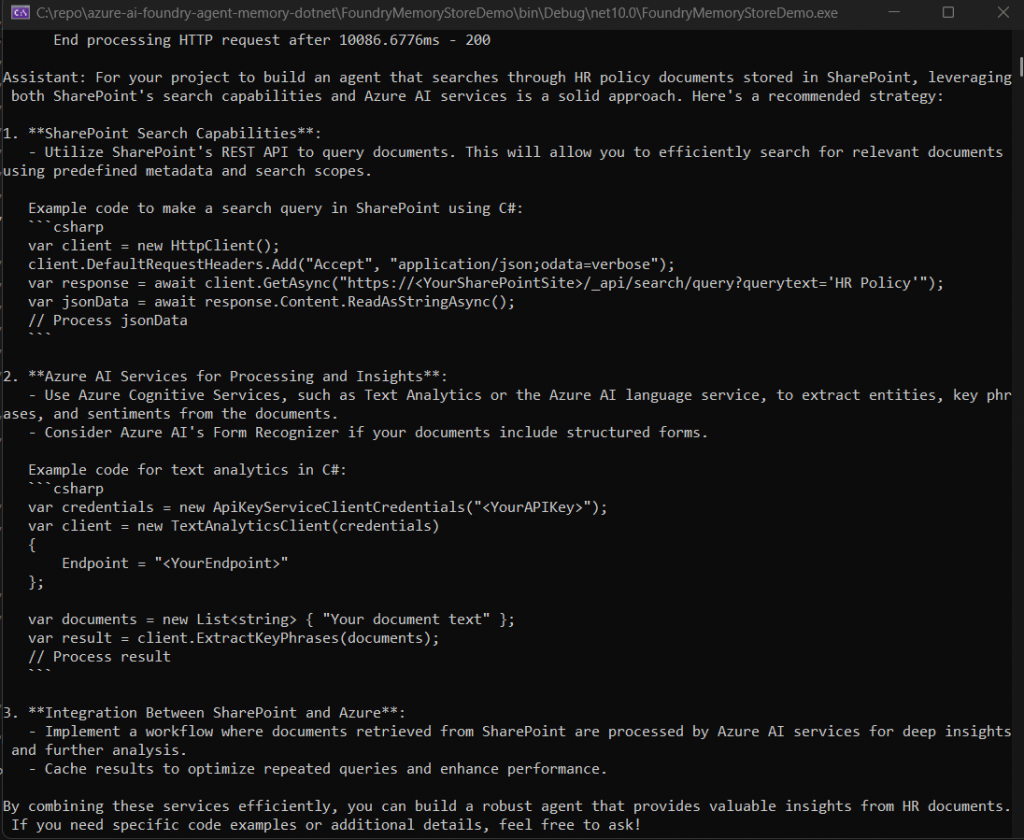
The /new command demonstrates the core value of memory. Start a conversation, establish some context (“I’m a .NET developer working on SharePoint integrations”), then type /new to start a fresh conversation. When you ask the agent a question in the new session, it should already know your background.
Testing the Memory Flow
Here’s a realistic test scenario to verify everything is working:
Session 1 establishes context:
You: Hi, I'm a senior developer at Contoso. I work primarily with SharePoint Online and Azure AI services. I prefer code examples in C#.

Assistant: Welcome! What are you working on?

You: Building a SharePoint Agent for searching HR policy documentsRunning /memories afterward shows what actually got captured:
Stored memories:
  [user_profile] Senior developer at Contoso, works with SharePoint Online and Azure AI services
  [user_profile] Prefers code examples in C#
[chat_summary] User is building an agent for searching HR policy documents in SharePointSession 2 starts after /new opens a fresh conversation:
You: What approach would you recommend for my current project?

Assistant: For your project to build an agent that searches through HR policy documents stored in SharePoint, leveraging both SharePoint's search capabilities and Azure AI services is a solid approach. Here's a recommended strategyNo repeated introductions. No re-explaining the project. The agent just picked up where the earlier session left off.
Limits, then and now
A few limits worth knowing about, as they stood during preview when this went live in March 2026, along with what’s since changed:
Each scope holds up to 10,000 memory items, and that’s still accurate. If you’re serving thousands of users, watch per-user memory growth.
The service was capped at 1,000 requests per minute during preview. I described that as one combined cap for reads and writes; Microsoft’s current documentation lists two separate 1,000-RPM ceilings, one for search and one for update, so combined throughput is higher than I originally implied.
Memory updates are debounced by update_delay. I set mine to 60 seconds and called that the default. Microsoft’s own samples now document 300 seconds (5 minutes) as the recommended production default, so treat 60 as a value I chose for faster local testing, not a platform default.
Consolidation, the LLM-based merging and deduplication of memories, isn’t fully deterministic. That part hasn’t changed.
At the time, you could delete every memory for a scope, or the whole store, but not a single item. That’s since changed: Microsoft’s latest preview added item-level operations, so you can now create, read, update, and delete individual memory records directly, alongside the scope- and store-level deletion this post already covers.
The .NET SDK gap I opened this post with has also closed. See the update note earlier in this post for what’s native now.
Cost Considerations
During the public preview, the memory feature itself is free. You’re not charged for storage or the management operations, but you are billed for the underlying model usage.
Extraction and consolidation run on your deployed chat model (GPT-4o, in this setup) to process conversation content and merge memories. Retrieval runs on your embedding model to search stored memories semantically.
What’s next
In Part 2, I’ll combine this with the SharePoint grounding tool, so the agent remembers a user’s role and preferences while it searches SharePoint content it’s actually allowed to see for that user.
Source Code
The complete source for this post is on GitHub: azure-ai-foundry-agent-memory-dotnet.
