Long-Running Work IQ Agents: Persistent State, REST, Governance, and Cost
Part 4 of a series on building agents with the Microsoft Work IQ API. Part 1 introduced Work IQ, Part 2 built a conversational A2A client, and Part 3 gave a custom agent Microsoft 365 capabilities through MCP.
The first three agents in this series were useful only while they were running.
Part 2 remembered a conversation through contextId. Part 3 could read and change Microsoft 365 data through MCP. Stop either process, however, and the application itself retained nothing.
That is fine for chat, but our clients increasingly ask for a different class of agent: ones that work across several sessions, checkpoint partial results, compare this week with last week, survive a restart and hand work to another agent.
Our private AI application has made that distinction very real. Conversation history is not the same as operational state. A long-running agent needs somewhere to store plans, intermediate outputs, review decisions and resumable checkpoints. It also needs retention, access control, auditing and a clear answer when compliance asks where that derived data lives.
The obvious answer is usually, “Put it in Blob Storage or Cosmos DB.”
Technically, that works. Operationally, it can create the next layer of infrastructure we have to govern ourselves.
Work IQ’s fourth component, Workspaces, is Microsoft’s answer to that problem: SharePoint Embedded working storage for persistent agent data inside the Microsoft 365 tenant boundary.
One limitation matters before we go further.
As of August 19, 2026, Microsoft publicly documents what Workspaces are, but I could not find a public Workspaces API reference or official sample that shows how to create and use one directly. I’m not going to invent that missing API.
Instead, this article builds the long-running workflow against the documented Work IQ REST API and puts storage behind an interface. Today, the sample uses a local folder. When the Workspaces API becomes public, the storage implementation can change without rewriting the agent.
That’s a more useful choice than publishing a speculative endpoint I’d have to walk back later.
Version note: Work IQ is changing quickly. The product-status, billing and governance notes in this article were checked against Microsoft documentation available on July 17, 2026, with the Workspaces API status reconfirmed on August 19, 2026. Verify the linked pages before using preview-sensitive details in production.
What a workspace changes
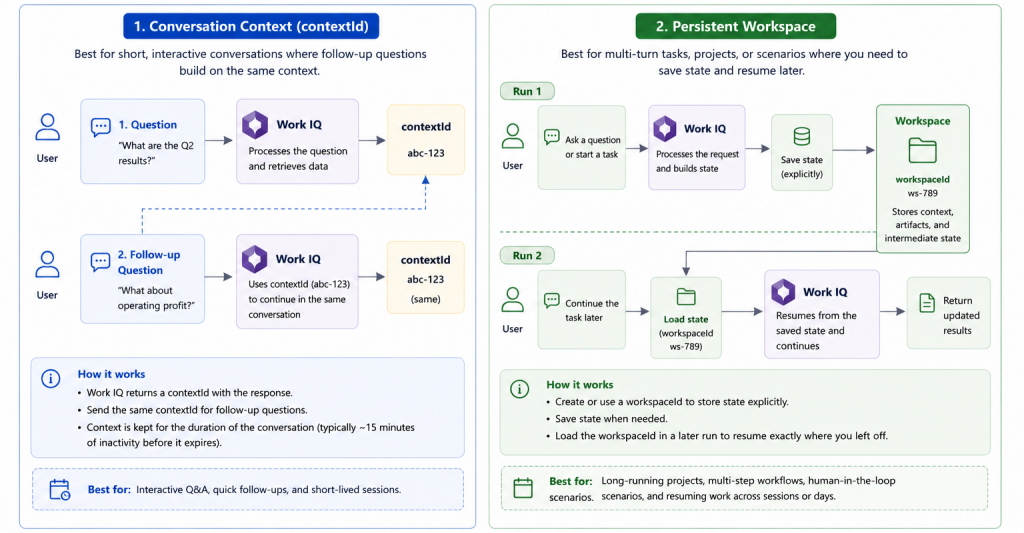
Microsoft describes Workspaces as persistent, SharePoint Embedded working storage for long-running agent workflows. The stated goals are task progression, reuse of intermediate results and handoff across agents and experiences.
That description is short, but it solves several separate problems.
An agent can resume rather than restart
Without persistent state, an agent that fails near document 450 while reviewing 500 project documents goes back to the beginning. With checkpoints, it records which items were processed and which outputs have already been approved.
Resumability is a state-management feature.
One run can become context for the next
A weekly status agent should retain the previous digest and compare it against new evidence, instead of rediscovering the entire project history every Monday. That surfaces what changed.
The same pattern appears in incident reviews, account planning, compliance checks and document-processing pipelines:
persist → recall → compare → update
Agents can hand off work through a governed boundary
One agent may collect evidence. Another may draft a report. A third may review the report against policy.
If every team invents its own storage contract, handoff becomes a collection of blob names and service credentials.
A shared workspace model turns the state itself into part of the platform contract.
Derived data stays closer to the governance model of its source
SharePoint Embedded content lives in the consuming tenant and supports Microsoft Purview capabilities including audit, eDiscovery, retention and data loss prevention. Administrators can also apply supported container controls such as sensitivity labels and conditional access.
SharePoint Embedded is API-only, so the owning application still has to build the user experience for policy tips and overrides.
Even so, the agent’s working data lives in a system the tenant already knows how to discover and govern.
For enterprise AI, that is a much stronger default than an anonymous agent-state-prod container that only the development team remembers exists.
Blob storage still needs a governance model
Azure Blob Storage and Cosmos DB are valid choices when the application deliberately owns the governance model.
The agent reads a confidential project document and produces:
- a summary;
- a list of risks;
- a recommendation;
- an intermediate reasoning note;
- a draft email based on those findings.
Those outputs are now work data derived from the original document. A production design has to answer questions such as:
- “Who can read the derived content?”
- “Does a legal hold include it?”
- “How long should it be retained?”
- “Can compliance search and export it?”
- “What happens when the source document is deleted?”
- “Does the state cross a client, project or user boundary?”
- “Which agent wrote it, and which agent changed it later?”
- “Can a user correct or remove it?”
A blob container can support a good answer to every question. The application team then has to build and operate those answers.
That’s the same pattern we saw with custom RAG in Part 1. The first version looks like a data pipeline. The production version becomes a governance platform.
Where the documentation stops
I want to draw this line precisely because Work IQ’s documentation has changed several times during this series.
Publicly documented
- Microsoft’s Work IQ overview names four components: Chat, Context, Tools and Workspaces.
- The Workspaces description says that SharePoint Embedded working storage provides a persistent area inside the Microsoft 365 tenant boundary for intermediate data and outputs.
- The Work IQ REST API is also publicly documented. It supports multi-turn conversations with Microsoft 365 Copilot through synchronous and streaming endpoints.
Not publicly documented as of August 19, 2026
- a Workspaces REST or Graph endpoint;
- a create-workspace request;
- an SDK type for a Work IQ workspace;
- a public authentication or permission contract specific to Workspaces;
- an official Workspaces sample in the
microsoft/work-iq-samplesrepository.
The absence matters. The public overview is enough to understand the architecture Microsoft is aiming for. It’s not enough to write production integration code. For now, I’ll treat Workspaces as a storage provider that should sit behind a narrow application interface. When the API contract arrives, I want to replace one class, not redesign the workflow.
REST finally gets its turn
A scheduled workflow is a good fit for REST.
The Work IQ REST API gives an application a conventional request/response model for multi-turn conversations:
- create a conversation;
- send a synchronous chat message, or use the streaming endpoint;
- reuse the conversation ID for later turns.
The documented endpoints used in this sample are:
POST https://workiq.svc.cloud.microsoft/rest/conversations
POST https://workiq.svc.cloud.microsoft/rest/conversations/{conversationId}/chat
POST https://workiq.svc.cloud.microsoft/rest/conversations/{conversationId}/chatOverStream
The documentation also publishes /rest/beta/… variants. This article uses the non-beta paths above.
A chat request contains:
- the user message;
- a required
locationHint; - optional
additionalContext; - optional
contextualResourcesfor OneDrive or SharePoint files and web-grounding controls.
The response contains the conversation messages and attribution metadata.
The REST API doesn’t create files or send email. It doesn’t schedule meetings either. Those actions belong on a tool surface such as the MCP design from Part 3.
It won’t run a long-lived task for you either. Microsoft explicitly lists long-running tasks as a REST API limitation.
That sounds contradictory in an article about long-running agents, but the distinction is important:
- the agent workflow can run over days or weeks;
- each Work IQ REST call should remain a bounded conversational step.
Your orchestrator owns scheduling, retries, checkpoints and state. Work IQ provides the grounded intelligence used at each step.
One authentication problem a weekly agent cannot ignore
Work IQ uses delegated authentication and requests run as a signed-in user. WorkIQAgent.Ask is a delegated permission, and application-only authentication isn’t supported.
This creates a scheduling challenge. A service principal cannot wake up on Monday morning and call Work IQ as nobody.
The console demo below uses interactive authentication because it’s easy to run locally.
A production scheduled workflow needs a deliberate delegated-token design. Common options include:
- a user authorises the application and the backend persists the MSAL token cache securely, then attempts AcquireTokenSilent for later runs;
- a user-facing application invokes the backend with an on-behalf-of flow;
- a platform-managed connection handles the user’s delegated context;
- the workflow runs only while an authorised user session is active.
A delegated agent still needs someone’s identity behind every scheduled run, and the design should say so plainly.
The sample: a weekly project digest that remembers
The agent will create a weekly Contoso migration digest.
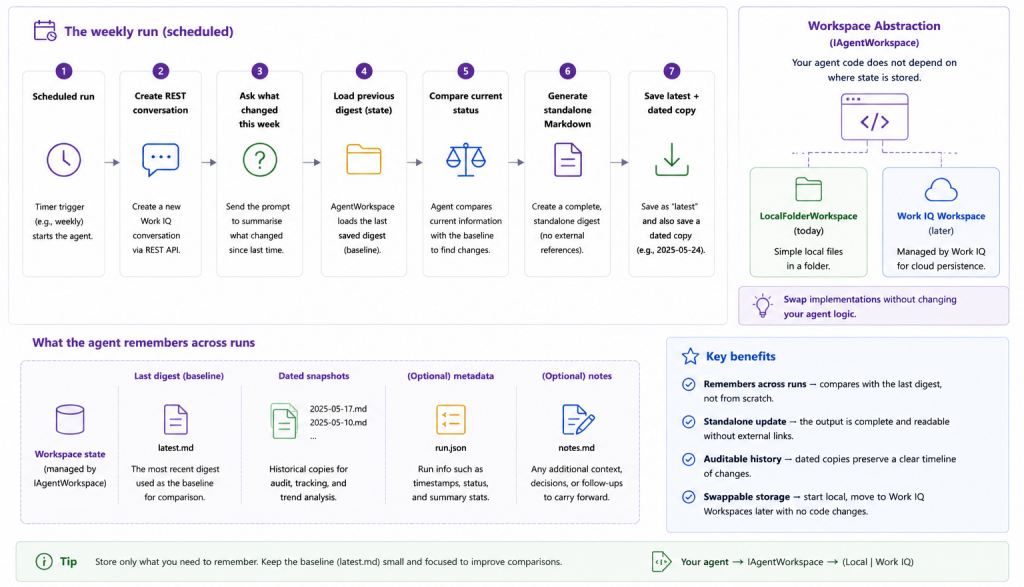
On each run it will:
- ask Work IQ what happened this week;
- load the previous digest;
- ask Work IQ to compare the new evidence with the previous state;
- save a standalone Markdown digest;
- retain a dated copy for history.
The storage boundary is intentionally small:
public interface IAgentWorkspace
{
    Task<string?> LoadAsync(
        string name,
        CancellationToken cancellationToken = default);

    Task SaveAsync(
        string name,
        string content,
        CancellationToken cancellationToken = default);
}The application knows it can load and save named text artifacts. It doesn’t know whether those artifacts live in a folder, SharePoint Embedded or a future Work IQ Workspace.
Create the project
dotnet new console -n Part4.Workspaces
cd Part4.Workspaces
dotnet add package Microsoft.Identity.ClientThe project file used for the sample is:
<Project Sdk="Microsoft.NET.Sdk">

  <PropertyGroup>
    <OutputType>Exe</OutputType>
    <TargetFramework>net10.0</TargetFramework>
    <ImplicitUsings>enable</ImplicitUsings>
    <Nullable>enable</Nullable>
  </PropertyGroup>

  <ItemGroup>
    <PackageReference Include="Microsoft.Identity.Client" Version="4.84.2" />
  </ItemGroup>

</Project>The Work IQ REST calls use HttpClient and System.Text.Json, so MSAL is the only additional package.
using System.Net.Http.Headers;
using Microsoft.Identity.Client;

const string ClientId = "<your-app-client-id>";
const string TenantId = "<your-tenant-id>";
const string Scope    = "api://workiq.svc.cloud.microsoft/.default";

var app = PublicClientApplicationBuilder
    .Create(ClientId)
    .WithAuthority($"https://login.microsoftonline.com/{TenantId}")
    .WithDefaultRedirectUri()
    .Build();

var auth = await app
    .AcquireTokenInteractive([Scope])
    .ExecuteAsync();

using var http = new HttpClient();
http.DefaultRequestHeaders.Authorization =
new AuthenticationHeaderValue("Bearer", auth.AccessToken);For production, replace the interactive flow with the delegated-token design appropriate to your host. Do not replace it with client credentials; Work IQ does not support application-only authentication.
A small REST client
I prefer keeping the transport wrapper boring. It creates a conversation, sends a message and returns text plus citations.
using System.Text;
using System.Text.Json;

public sealed record WorkIQCitation(string Name, string Url);

public sealed record WorkIQChatResult(
    string Text,
    IReadOnlyList<WorkIQCitation> Citations);

public sealed class WorkIQRestClient(HttpClient http, string timeZone)
{
    private const string BaseUrl =
        "https://workiq.svc.cloud.microsoft/rest";

    public async Task<string> CreateConversationAsync(
        CancellationToken cancellationToken = default)
    {
        using var content =
            new StringContent("{}", Encoding.UTF8, "application/json");

        using var response = await http.PostAsync(
            $"{BaseUrl}/conversations",
            content,
            cancellationToken);

        response.EnsureSuccessStatusCode();

        await using var stream =
            await response.Content.ReadAsStreamAsync(cancellationToken);

        using var document = await JsonDocument.ParseAsync(
            stream,
            cancellationToken: cancellationToken);

        return document.RootElement
            .GetProperty("id")
            .GetString()
            ?? throw new InvalidOperationException(
                "Work IQ did not return a conversation ID.");
    }

    public async Task<WorkIQChatResult> ChatAsync(
        string conversationId,
        string prompt,
        string? additionalContext = null,
        CancellationToken cancellationToken = default)
    {
        var body = new Dictionary<string, object?>
        {
            ["message"] = new { text = prompt },
            // Required on every chat call — this is not A2A's optional metadata.
            // The API wants IANA (e.g. "America/Los_Angeles"), but TimeZoneInfo.Local.Id
            // returns the Windows name (e.g. "Pacific Standard Time") on Windows.
            ["locationHint"] = new { timeZone = TimeZoneInfo.TryConvertWindowsIdToIanaId(TimeZoneInfo.Local.Id, out var ianaId) ? ianaId : TimeZoneInfo.Local.Id }
        };

        if (!string.IsNullOrWhiteSpace(additionalContext))
        {
            body["additionalContext"] =
                new[] { new { text = additionalContext } };
        }

        using var content = new StringContent(
            JsonSerializer.Serialize(body),
            Encoding.UTF8,
            "application/json");

        using var response = await http.PostAsync(
            $"{BaseUrl}/conversations/{conversationId}/chat",
            content,
            cancellationToken);

        response.EnsureSuccessStatusCode();

        await using var stream =
            await response.Content.ReadAsStreamAsync(cancellationToken);

        using var document = await JsonDocument.ParseAsync(
            stream,
            cancellationToken: cancellationToken);

        var messages = document.RootElement
            .GetProperty("messages")
            .EnumerateArray()
            .ToArray();

        if (messages.Length == 0)
            throw new InvalidOperationException(
                "Work IQ returned no conversation messages.");

        var answer = messages[^1];
        var text = answer.TryGetProperty("text", out var textElement)
            ? textElement.GetString() ?? ""
            : "";

        var citations = new List<WorkIQCitation>();

        if (answer.TryGetProperty("attributions", out var attributions) &&
            attributions.ValueKind == JsonValueKind.Array)
        {
            foreach (var attribution in attributions.EnumerateArray())
            {
                var type = attribution.TryGetProperty(
                    "attributionType", out var typeElement)
                    ? typeElement.GetString()
                    : null;

                if (!string.Equals(
                    type,
                    "citation",
                    StringComparison.OrdinalIgnoreCase))
                {
                    continue;
                }

                var name = attribution.TryGetProperty(
                    "providerDisplayName", out var nameElement)
                    ? nameElement.GetString()
                    : null;

                var url = attribution.TryGetProperty(
                    "seeMoreWebUrl", out var urlElement)
                    ? urlElement.GetString()
                    : null;

                citations.Add(new WorkIQCitation(
                    string.IsNullOrWhiteSpace(name)
                        ? "(source)"
                        : name,
                    url ?? ""));
            }
        }

        return new WorkIQChatResult(text, citations);
    }
}Use an IANA time-zone identifier
The REST documentation shows IANA time zones such as America/New_York.
On Linux and macOS, TimeZoneInfo.Local.Id is normally already an IANA identifier. On Windows it may be a Windows time-zone ID.
This helper normalises it where .NET can perform the conversion:
static string GetLocalIanaTimeZone()
{
    var id =  new { timeZone = TimeZoneInfo.TryConvertWindowsIdToIanaId(TimeZoneInfo.Local.Id, out var ianaId) ? ianaId : TimeZoneInfo.Local.Id };

    if (OperatingSystem.IsWindows() &&
        TimeZoneInfo.TryConvertWindowsIdToIanaId(id, out var ianaId))
    {
        return ianaId;
    }

    return id;
}The temporary local workspace
The local folder makes the workflow runnable before a public Workspaces API contract exists. It isn’t a production recommendation.
public sealed class LocalFolderWorkspace : IAgentWorkspace
{
    private readonly string _root;

    public LocalFolderWorkspace(string workspaceName)
    {
        ArgumentException.ThrowIfNullOrWhiteSpace(workspaceName);

        var invalidChars = Path.GetInvalidFileNameChars();
        var safeName = new string(workspaceName
            .Select(c => invalidChars.Contains(c) ? '_' : c)
            .ToArray());

        _root = Path.Combine(
            AppContext.BaseDirectory,
            "agent-workspaces",
            safeName);

        Directory.CreateDirectory(_root);
    }

    public async Task<string?> LoadAsync(
        string name,
        CancellationToken cancellationToken = default)
    {
        var path = GetSafePath(name);

        return File.Exists(path)
            ? await File.ReadAllTextAsync(path, cancellationToken)
            : null;
    }

    public async Task SaveAsync(
        string name,
        string content,
        CancellationToken cancellationToken = default)
    {
        ArgumentNullException.ThrowIfNull(content);

        var path = GetSafePath(name);
        await File.WriteAllTextAsync(
            path,
            content,
            cancellationToken);
    }

    private string GetSafePath(string name)
    {
        ArgumentException.ThrowIfNullOrWhiteSpace(name);

        if (!string.Equals(
            name,
            Path.GetFileName(name),
            StringComparison.Ordinal))
        {
            throw new ArgumentException(
                "Workspace artifact names cannot contain a path.",
                nameof(name));
        }

        return Path.Combine(_root, name);
    }
}Run the weekly workflow
The first request gathers current project activity. The second request asks for a complete standalone digest and, when available, injects the previous digest through additionalContext.
using System.Text;

var workspace = new LocalFolderWorkspace(
    "contoso-migration");

var lastDigest = await workspace.LoadAsync(
    "latest-digest.md");

var conversationId =
    await client.CreateConversationAsync();

var currentStatus = await client.ChatAsync(
    conversationId,
    """
    Review my Microsoft 365 work from this week related to the
    Contoso migration. Identify decisions, completed work,
    open blockers, owners, deadlines and evidence that a
    previously reported issue has changed.
    """);

WorkIQChatResult finalResult;

if (string.IsNullOrWhiteSpace(lastDigest))
{
    finalResult = await client.ChatAsync(
        conversationId,
        """
        Turn the findings into a standalone weekly project digest.
        Use these sections: Executive summary, Decisions,
        Progress, Blockers, Owners and next actions.
        Be explicit when evidence is incomplete.
        """);
}
else
{
    finalResult = await client.ChatAsync(
        conversationId,
        """
        Compare the current week's findings with the previous
        digest supplied as additional context.

        Produce a complete standalone weekly project digest,
        not just a list of differences.

        Call out:
        - what changed;
        - what was completed;
        - new blockers;
        - items that appear stalled;
        - ownership or deadline changes;
        - claims that lack enough evidence.

        Use these sections: Executive summary, Changes since
        last week, Decisions, Progress, Blockers, Owners and
        next actions.
        """,
        additionalContext: lastDigest);
}

var citations = currentStatus.Citations
    .Concat(finalResult.Citations)
    .Where(citation =>
        !string.IsNullOrWhiteSpace(citation.Url))
    .DistinctBy(citation => citation.Url)
    .ToArray();

var digest = new StringBuilder()
    .AppendLine(
        $"# Contoso migration weekly digest — " +
        $"{DateTime.UtcNow:yyyy-MM-dd}")
    .AppendLine()
    .AppendLine(finalResult.Text.Trim())
    .AppendLine();

if (citations.Length > 0)
{
    digest.AppendLine("## Sources");
    digest.AppendLine();

    foreach (var citation in citations)
    {
        digest.AppendLine(
            $"- [{citation.Name}]({citation.Url})");
    }
}

var markdown = digest.ToString();

await workspace.SaveAsync(
    "latest-digest.md",
    markdown);

await workspace.SaveAsync(
    $"digest-{DateTime.UtcNow:yyyy-MM-dd}.md",
    markdown);

Console.WriteLine(markdown);What I would store when Workspaces becomes callable
The interface in this article stores Markdown because it makes the demo visible. A production workspace should separate human-readable outputs from machine-readable state.
/latest-digest.md
/digests/2026-07-13.md
/state/project-status.json
/state/open-items.json
/checkpoints/last-success.json
/logs/run-2026-07-13.json
The JSON state can contain stable identifiers, owners, dates and processing checkpoints. The Markdown remains the report people read.
I’d also attach metadata for: tenant; user or delegated identity; agent version; run ID; source time window; creation and update time; retention category; approval state.
That metadata becomes essential when more than one agent uses the same workspace.
The demo makes the missing piece visible
Long-running workflows are awkward to demonstrate live because the interesting event is time passing.
I’d present this one in two runs.
First run
Run the agent with no previous digest.
It gathers the current week’s evidence, produces a report and saves:
latest-digest.md
digest-2026-07-17.md
Open the file so the audience can see that state left the process.
Second run
Edit the local digest to simulate a previous week’s state, or run the demo against a prepared older copy.
Run the agent again.
The second turn should surface what changed and flag stalled items, then replace latest-digest.md while preserving a dated snapshot.
The closing point is simple:
The workflow is already long-running. The local folder is the only part that is not yet Work IQ Workspace storage.
Governance is layered
Work IQ layers on top of Microsoft Entra ID and the signed-in user’s Microsoft 365 permissions. Microsoft describes four layers:
- Entra authentication establishes the user and application.
- OAuth permissions define broad Work IQ capabilities.
- Microsoft 365 permissions limit what that user can access.
- Work IQ policy can evaluate the operation at request time.
The public policy documentation is currently most detailed for MCP. It describes a Rego-based layer that can evaluate the tool, path, operation, request content and tenant context.
In the initial MCP release:
- tenant administrators can turn Work IQ MCP policy on or off;
- mutation operations are blocked by default;
- supported write scenarios can be enabled through tenant policy;
- the underlying Microsoft 365 permission check still applies after policy approval;
- policy changes can take time to propagate.
That’s a useful reminder for our Part 3 agent: successful authentication doesn’t guarantee that create_entity or do_action is allowed.
For the REST calls in this article, the documented guarantees are delegated access and Microsoft 365 compliance controls. I wouldn’t assume every MCP policy control maps identically to REST unless Microsoft documents it.
For future Workspaces integration, I’d verify four separate layers:
- who can access the workspace;
- which agent can write which artifacts;
- how retention and compliance policies apply;
- what audit record is produced for each change.
“Stored in Microsoft 365” is a starting point for the threat model. The four questions above are what come next.
A long-running agent is also a recurring cost
Work IQ API usage is billed through a consumption model measured in Copilot Credits.
Microsoft’s cost-management experience, current as of August 2026, supports:
- spending policies;
- access limits;
- budgets;
- alerts;
- hard caps;
- reporting by user, group, service or agent;
- prepaid and pay-as-you-go billing options.
That tooling is especially relevant for scheduled agents because small design choices multiply.
Consider:
users × agents × runs per day × Work IQ calls per runA weekly digest for one project is one workload.
An hourly digest for every account team, plus retries and comparison turns, is a different workload even though the code looks nearly identical.
I’d measure at least:
- successful calls per run;
- retries;
- calls by agent and user;
- average and peak credit consumption;
- failed runs after credits or policy limits are reached;
- whether the schedule can be reduced without hurting the product.
I’d also avoid quoting a Workspaces-specific price until Microsoft publishes the actual metering model for that API. The Work IQ API uses Copilot Credits; SharePoint Embedded has its own metered storage and API model. How Work IQ Workspaces packages those costs isn’t something I can verify from the current public reference.
Cost is part of agent behaviour.
An agent that checks every hour because it can may be less valuable than one that runs once a day when new evidence exists.
What caught me out in this part
Long-running workflow doesn’t mean long-running REST request
The REST API explicitly doesn’t support long-running tasks. The durable part is the orchestrator and workspace. Work IQ calls should remain bounded steps.
Delegated-only authentication changes scheduling
The weekly agent still acts as a user. Production scheduling needs a token-cache or managed-connection design. A client-secret-only daemon isn’t a supported shortcut.
Persisted summaries are sensitive data
The digest may contain less detail than the original emails and files, but it can still reveal confidential decisions and names. Derived text needs the same deliberate governance discussion as source documents.
The absence of an API reference is itself a design constraint
I’d rather ship an interface backed by temporary storage than couple the application to guessed endpoints. That abstraction is how the sample remains honest and replaceable.
Looking back across the series
The four Work IQ components solve different parts of the same architecture.
| Part | Work IQ component | What we built |
|---|---|---|
| Part 1 | Chat over raw A2A | A first grounded answer with citations |
| Part 2 | Chat through the A2A SDK | Multi-turn context and streaming |
| Part 3 | Tools through MCP | A self-discovering Microsoft 365 tool client |
| Part 4 | Workspaces design + REST Chat | A resumable weekly digest with replaceable storage |
Work IQ is interesting because it pulls more of that operational surface into the Microsoft 365 platform. Workspaces could complete that story for persistent state. The architecture is visible today. The public API contract is the piece I’m still waiting for.
Code for this article is in Part4.Workspaces. I will update the sample when Microsoft publishes a Workspaces API reference.
