Building a Conversational Work IQ Agent in C#: The A2A SDK, Multi-Turn, and Streaming
Part 2 of a series on building agents with the Microsoft Work IQ API. Part 1 explained the Work IQ model and made a first grounded call with raw HttpClient.
The raw A2A call in Part 1 was useful for one reason: it showed exactly what crossed the wire.
I could see the Work IQ token audience, the JSON-RPC method, the A2A version header and the response shape. That removed a lot of guesswork.
It also produced code I wouldn’t want to maintain.
The application built the protocol envelope by hand, parsed JsonDocument nodes by hand and forgot the conversation as soon as the process moved to the next question. The user also saw an empty console while Work IQ assembled the entire answer.
That’s enough for a protocol experiment. Not yet a conversational agent.
This part fixes three things:
- the SDK takes ownership of the A2A protocol;
- contextId carries the conversation across turns;
- streaming gives the user progress and answer text as they arrive.
The conversation-state piece was particularly interesting to me. In the private AI application our team has been building for clients, memory and context have required deliberate design across agents and sessions. Work IQ’s short-term conversational context is much simpler: capture an identifier and send it back.
That simplicity is the protocol doing its job.
Version note: This article uses the A2A and MSAL package versions shown below because they match the sample I tested. The A2A SDK was still a preview package when I wrote this, so check NuGet and the current Work IQ samples before upgrading.
What the SDK actually improves
I initially expected the A2A SDK to save a few lines of JSON.
It does that, but the more useful change is conceptual. The code starts talking in terms of messages, tasks, artifacts and status updates instead of dictionaries and property names.
That makes the boundary clearer:
- MSAL acquires the delegated token.
- HttpClient carries the authentication and A2A version header.
- The SDK handles the protocol.
- My code handles the conversation and user experience.
I like that separation: the SDK doesn’t own authentication, and the authentication code from Part 1 barely changes.
Create the project:
dotnet new console -n Part2.ConversationalAgent
cd Part2.ConversationalAgent
dotnet add package A2A --prerelease
dotnet add package Microsoft.Identity.ClientThe versions I used were:
<Project Sdk="Microsoft.NET.Sdk">

  <PropertyGroup>
    <OutputType>Exe</OutputType>
    <TargetFramework>net10.0</TargetFramework>
    <ImplicitUsings>enable</ImplicitUsings>
    <Nullable>enable</Nullable>
  </PropertyGroup>

  <ItemGroup>
    <PackageReference Include="A2A" Version="1.0.0-preview2" />
    <PackageReference Include="Microsoft.Identity.Client" Version="4.84.2" />
  </ItemGroup>

</Project>A small preview-package warning: a custom NuGet configuration can prevent restore from finding A2A. If that happens, add a nuget.config beside the project and make sure nuget.org is included as a source. The official samples use the same workaround.
Replace the handwritten envelope
The first change is deliberately boring. We will ask the same question as Part 1, but the SDK will build and parse the A2A messages.
using System.Net.Http.Headers;
using System.Text.Json;
using A2A;
using Microsoft.Identity.Client;

const string ClientId = "<your-app-client-id>";
const string TenantId = "<your-tenant-id>";
const string Scope    = "api://workiq.svc.cloud.microsoft/.default";
const string Endpoint = "https://workiq.svc.cloud.microsoft/a2a/";

// --- Auth: identical to Part 1 ---
var app = PublicClientApplicationBuilder
    .Create(ClientId)
    .WithAuthority($"https://login.microsoftonline.com/{TenantId}")
    .WithDefaultRedirectUri()
    .Build();

var auth = await app.AcquireTokenInteractive(new[] { Scope }).ExecuteAsync();

// --- Bring your own authed HttpClient, then hand it to the SDK ---
var http = new HttpClient();
http.DefaultRequestHeaders.Authorization =
    new AuthenticationHeaderValue("Bearer", auth.AccessToken);
// Still required — opts in to the A2A v1.0 wire format (see Part 1).
http.DefaultRequestHeaders.TryAddWithoutValidation("A2A-Version", "1.0");

var client = new A2AClient(new Uri(Endpoint), http);

// --- Build a typed message and send it ---
var message = new Message
{
    Role      = Role.User,
    MessageId = Guid.NewGuid().ToString(),
    Parts     = [Part.FromText("What meetings do I have today?")],
    Metadata  = new Dictionary<string, JsonElement>
    {
        ["Location"] = JsonSerializer.SerializeToElement(new
        {
            timeZoneOffset = (int)TimeZoneInfo.Local.BaseUtcOffset.TotalMinutes,
            timeZone = TimeZoneInfo.Local.Id
        })
    }
};

var response = await client.SendMessageAsync(new SendMessageRequest { Message = message });

// The answer text lives in the task's artifacts.
if (response.PayloadCase == SendMessageResponseCase.Task)
{
    var task = response.Task!;
    var text = string.Join("", task.Artifacts!
        .SelectMany(a => a.Parts)
        .Where(p => p.ContentCase == PartContentCase.Text)
        .Select(p => p.Text));
    Console.WriteLine(text);
}The code is shorter, but one response detail still matters.
A SendMessageResponse can contain different payload types. In the Work IQ flow above, we expect a Task.
The final answer lives in:
Task.Artifacts[].PartsThe status message carries task state, progress text and metadata such as attributions. The artifacts carry the answer.
I mixed those concepts together the first time I read the response model. Keeping them separate makes both synchronous and streaming handling much easier:
- Artifacts are the output.
- Status describes what is happening around that output.
The one value that makes follow-up questions work
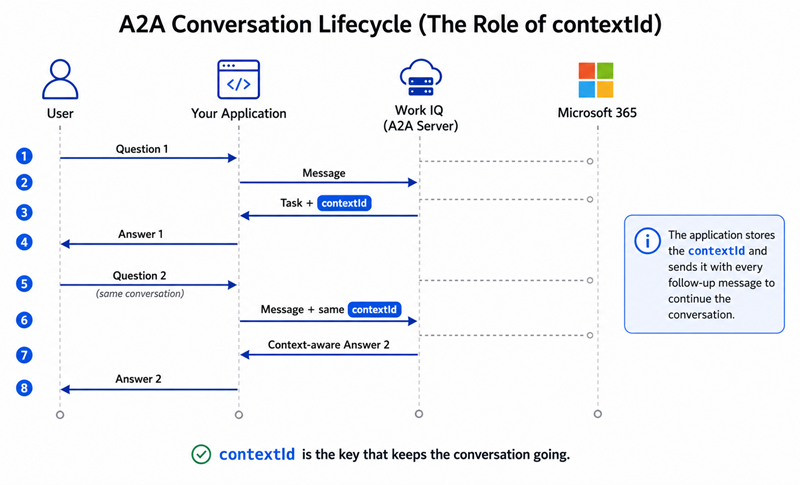
Now we can turn the one-shot call into a conversation.
Each Work IQ task can carry a contextId. Put that value on the next user message and Work IQ treats the next request as part of the same conversation.
There’s no need to resend an ever-growing array of previous messages in this sample. The server-side context is represented by the identifier.
Here is a small console REPL:
string? contextId = null;
Console.WriteLine("Ask Work IQ something ('quit' to exit).\n");

while (true)
{
    Console.Write("You > ");
    var input = Console.ReadLine();
    if (string.IsNullOrWhiteSpace(input) ||
        input.Equals("quit", StringComparison.OrdinalIgnoreCase))
        break;

    var message = new Message
    {
        Role      = Role.User,
        MessageId = Guid.NewGuid().ToString(),
        ContextId = contextId,                 // null on turn 1, reused after
        Parts     = [Part.FromText(input)],
        Metadata  = new Dictionary<string, JsonElement>
        {
            ["Location"] = JsonSerializer.SerializeToElement(new
            {
                timeZoneOffset = (int)TimeZoneInfo.Local.BaseUtcOffset.TotalMinutes,
                timeZone = TimeZoneInfo.Local.Id
            })
        }
    };

    var response = await client.SendMessageAsync(new SendMessageRequest { Message = message });
    var task = response.Task!;

    // Capture the contextId so the *next* turn continues this thread.
    contextId = task.ContextId ?? contextId;

    var text = string.Join("", task.Artifacts!
        .SelectMany(a => a.Parts)
        .Where(p => p.ContentCase == PartContentCase.Text)
        .Select(p => p.Text));
    Console.WriteLine(text + "\n");
}Try a follow-up that would be meaningless on its own:
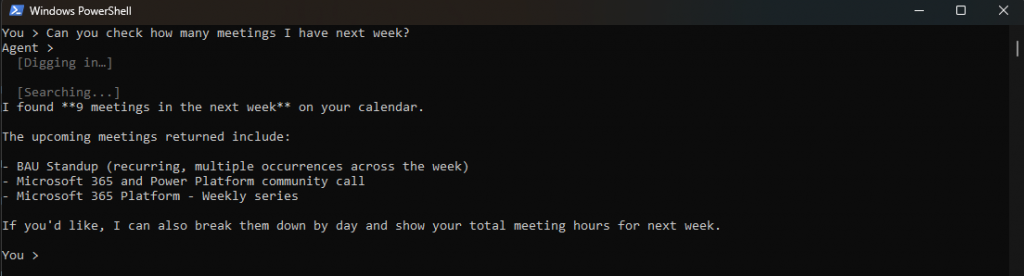
The second answer only makes sense because Work IQ remembered the first. No history array, no re-sending the prior turns — contextId does it, server-side. If you’ve read my Foundry memory posts, notice the contrast: there I wired up long-term memory myself; here the conversation state is just part of the protocol.
Streaming is more than printing tokens
The synchronous version now works, but the user still waits in silence.
That matters more with Work IQ than with a simple text-completion call. The service may need to find relevant meetings, messages and files before it can assemble the response.
Streaming improves two parts of that experience:
- answer text appears as it becomes available;
- status updates show that the request is making progress.
I deliberately call those messages status updates. They’re observable progress messages from the service, separate from the model’s internal reasoning.
Switch from SendMessageAsync to SendStreamingMessageAsync. The method returns an IAsyncEnumerable, so each event can be processed as it arrives.
These are the payloads worth recognising:
PayloadCase | How I use it |
|---|---|
Task | Capture the initial task and its contextId |
StatusUpdate | Render user-facing progress and capture final metadata |
ArtifactUpdate | Build and display the answer |
Message | Handle a direct reply if the flow returns one |
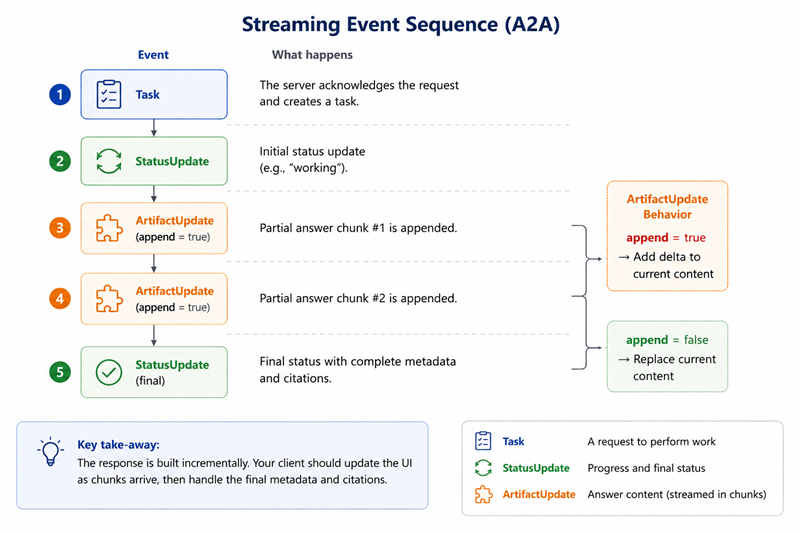
The event type is straightforward. The chunking behaviour took more attention.
Append changes how the chunk should be rendered
An ArtifactUpdate contains an Append flag.
When Append is true, the new text is a delta. Add it to the buffer and print it.
When Append is false, the update represents the artifact value at that point. In my tests, Work IQ sent replacement chunks as extensions of the previous text. Printing the complete value every time would duplicate the answer, so the code below prints only the new suffix when possible.
This is one of those details that looks obvious after you solve it and slightly mysterious before you do.
using System.Text;

static async Task<string?> StreamAnswer(A2AClient client, Message message)
{
    string? contextId = null;
    var buffers = new Dictionary<string, StringBuilder>();
    Dictionary<string, JsonElement>? finalMetadata = null;

    await foreach (var evt in client.SendStreamingMessageAsync(
        new SendMessageRequest { Message = message }))
    {
        switch (evt.PayloadCase)
        {
            case StreamResponseCase.Task:
                contextId = evt.Task!.ContextId;
                break;

            case StreamResponseCase.StatusUpdate:
                var status = evt.StatusUpdate!;
                if (status.Status.Message is { } m)
                {
                    contextId     = m.ContextId ?? contextId;
                    finalMetadata = m.Metadata;          // where citations currently arrive (terminal event)

                    var thought = JoinText(m.Parts);
                    if (!string.IsNullOrEmpty(thought))
                        WriteDim($"\n  [{thought}]");     // progress / status line
                }
                break;

            case StreamResponseCase.ArtifactUpdate:
                var au  = evt.ArtifactUpdate!;
                var id  = au.Artifact.ArtifactId;
                if (!buffers.TryGetValue(id, out var sb))
                    buffers[id] = sb = new StringBuilder();

                var chunk = JoinText(au.Artifact.Parts);

                if (au.Append)
                {
                    sb.Append(chunk);
                    Console.Write(chunk);                 // print the delta
                }
                else
                {
                    // Replace: each chunk is a prefix-extension — print only the new suffix.
                    var old = sb.ToString();
                    sb.Clear();
                    sb.Append(chunk);
                    Console.Write(chunk.StartsWith(old, StringComparison.Ordinal)
                        ? chunk[old.Length..]
                        : chunk);
                }
                break;
        }
    }

    if (finalMetadata is not null) PrintCitations(finalMetadata);
    return contextId;

    static string JoinText(IEnumerable<Part> parts) =>
        string.Join("", parts
            .Where(p => p.ContentCase == PartContentCase.Text)
            .Select(p => p.Text));
}Use it inside the REPL:
Console.Write("Agent > ");
contextId = await StreamAnswer(client, message);
Console.WriteLine("\n");The user now sees activity while Work IQ gathers context, followed by the answer as it is produced.
The total request time might stay about the same. It feels faster because the interface no longer freezes.
That distinction matters in real applications.
Citations currently arrive with the final status metadata
The citation code is similar to Part 1. The difference is where we capture the metadata during the stream.
static void PrintCitations(Dictionary<string, JsonElement> metadata)
{
    if (!metadata.TryGetValue("attributions", out var attrs) ||
        attrs.ValueKind != JsonValueKind.Array)
        return;

    Console.WriteLine("\n\nSources:");
    foreach (var a in attrs.EnumerateArray())
    {
        var name = a.TryGetProperty("providerDisplayName", out var n) ? n.GetString() : "(source)";
        var url  = a.TryGetProperty("seeMoreWebUrl", out var u) ? u.GetString() : "";
        Console.WriteLine($"  • {name}  {url}");
    }
}

static void WriteDim(string s)
{
    Console.ForegroundColor = ConsoleColor.DarkGray;
    Console.WriteLine(s);
    Console.ResetColor();
}At the time I tested this SDK, the attribution array arrived in Status.Message.Metadata.
The upstream Work IQ samples also called out that location as temporary, with citation data expected to move toward a structured data part eventually. That’s exactly the sort of preview detail I don’t want hidden in a tutorial.
If a later SDK version stops returning attributions from status metadata, check the artifact parts and current sample code before assuming Work IQ has stopped returning citations.
Response shapes move. The requirement to show the sources shouldn’t.
Three things that caught me out
You still need to understand A2A
It’s still useful to know why the A2A-Version header exists, where the contextId comes from and why the answer is an artifact.
Without that mental model, SDK errors become harder to diagnose.
Separate progress from the answer
My first instinct was to concatenate every text-looking value. That mixes progress messages with the final answer.
Treat status and artifacts as separate user-interface channels.
contextId covers short-term conversation state
It solves follow-up questions inside one conversation. Long-running applications still need a separate, durable memory layer.
That distinction is important for the client projects we are building. Short-term context and long-term memory have different retention and privacy requirements.
Chat and Context are different building blocks
Everything in this article uses the Chat side of Work IQ. We ask a question and receive a synthesised, cited answer.
The Context component serves a different design. It can provide relevant grounding for an agent that wants to perform its own synthesis.
The rough mental model is:
- Chat: let Work IQ answer;
- Context: let Work IQ gather, then let my agent answer.
A custom orchestrator may use both. It can ask Work IQ to answer broad work questions and request context when its own model, policies or workflow should control the final output.
That topic deserves its own full example, so it’s staying out of this article.
Is this ready for production?
It’s a much better starting point.
We now have typed protocol objects and multi-turn continuity. Streaming delivers progress and the artifacts, with citations attached. The calls remain delegated and permission-aware, and I still have no Microsoft 365 retrieval pipeline in the application.
Production work remains:
- token caching and refresh;
- cancellation and timeout handling;
- transient retry rules;
- logging without leaking sensitive work content;
- a clear user interface for sources and progress;
- a deliberate boundary between conversational context and durable memory.
The SDK removes protocol plumbing. Application engineering is still your job.
That’s the right outcome.
Part 3 changes the model completely. Instead of delegating an entire question to Work IQ, we will expose Microsoft 365 capabilities to our own agent through MCP.
That’s where the experience from our private AI application becomes especially relevant. Once your own orchestrator is making decisions, the real challenge is: how do I give this agent useful tools without burying it under hundreds of tool definitions?
Work IQ’s answer is ten verbs.
Code for this article is in Part2.ConversationalAgent. Next: why the Work IQ MCP server only needs ten tools.
