Meet Work IQ: The Intelligence Behind Copilot, Now an API You Can Build On
Over the last year, our team has been building a private AI application for clients. The use cases changed from project to project, but the infrastructure underneath them started to look uncomfortably familiar.
We needed agents. Then tools for those agents. Then connectors to Microsoft 365 and other systems. Then indexing, retrieval, conversation state, monitoring and permission checks. Every new capability solved a user problem while quietly giving us another component to operate.
I saw the same pattern in my own experiments. In my SharePoint agents series, I grounded an agent in SharePoint content. Later, I added long-term memory to Foundry agents so they could retain useful information between conversations.
The demos worked. The engineering bill arrived afterwards.
Connectors need maintenance. Indexes fall behind. Retrieval quality changes as content grows. Permissions are even less forgiving: a system that gets access control right 99% of the time is not nearly good enough.
That is why Work IQ caught my attention. It reached general availability on June 16, 2026, but the announcement itself was not the interesting part for me. I was more interested in the code I might no longer need to own: sync jobs, custom indexes, permission-trimming logic and the long list of edge cases that appear when a prototype becomes a client-facing application.
This series is my attempt to understand whether Work IQ genuinely removes that work or simply moves it behind another SDK.
This first part covers the mental model that clicked for me, and the smallest useful call I could make from C#. Part 2 adds the A2A SDK, multi-turn context and streaming. Part 3 moves from delegated answers to MCP tools.
Version note: The API details in this article were checked against the Microsoft documentation available in July 2026. Work IQ is moving quickly, so check the linked documentation before copying preview-specific code into a production project.
The hard part was never the demo
Take a question like this one:
Catch me up on the Contoso migration. What changed, who owns the open actions, and what did we agree in the last review?
The impressive part of a demo is always the final answer. The difficult part is the system behind it.
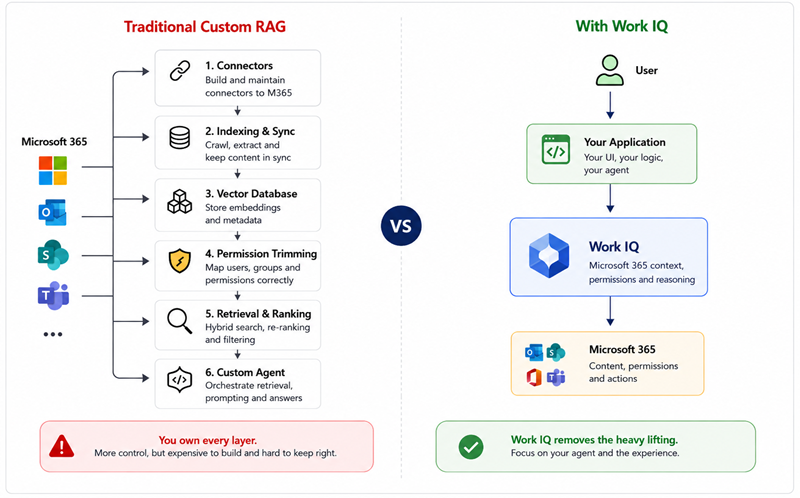
To answer properly, the agent may need information from email, Teams chats, meeting transcripts, SharePoint, OneDrive and the organisation directory. A traditional implementation usually grows into something like this:
- Connect to each source.
- Extract and index the content.
- Keep every index in sync.
- Reproduce enough of Microsoft 365’s permission model to filter every result correctly.
- Rank the retrieved content and send it to a model.
- Preserve citations so the user can verify the answer.
- Monitor the whole pipeline when the data, permissions or APIs change.
Permission trimming is the part most demos skip, and it’s the part that matters most.
A stale result is annoying. A result containing a document the user should not see is a security incident.
That failure rarely arrives as a helpful exception. The application still returns a fluent answer. The problem is that one of its sources crossed a sharing boundary, sensitivity label or access rule that your custom pipeline did not model correctly.
This is where several of my prototypes turned into data-governance problems instead of AI problems.
The mental model that finally clicked
My first assumption was that Work IQ would be Microsoft Graph with a more conversational endpoint. Building both versions changed my mind.
Graph gives your application data. You call /me/messages, receive messages and decide what to do with them.
Work IQ gives an agent access to Microsoft’s understanding of work. It combines Microsoft 365 data with context, permissions and reasoning so the caller can ask a work-shaped question rather than manually reconstructing the answer from several APIs.
That difference sounds small until you build both versions.
With Graph, the application owns retrieval, ranking and synthesis. With Work IQ Chat, the application can hand over the question and receive a grounded answer with citations. The request still runs as the signed-in user, so existing Microsoft 365 permissions and compliance controls remain part of the boundary.
The simplest comparison I can offer is this:
- Graph is the filing system.
- Work IQ is the colleague who can investigate the filing system and explain what matters.
Both are useful. They solve different problems.
The four parts of Work IQ
Microsoft describes Work IQ through four connected components. I find it easier to think about them in terms of what an agent needs.
- Chat answers a natural-language question using grounded Microsoft 365 context. This is where I start in Parts 1 and 2.
- Context assembles relevant grounding for an agent that wants to perform its own reasoning rather than receive a finished answer.
- Tools let an agent read, create, update and act across Microsoft 365. Part 3 explores this through MCP.
- Workspaces provide persistent working state for longer-running agent scenarios.
The distinction between Chat and Tools is especially important.
Sometimes you want to delegate the whole problem:
Find the latest decisions about this project and summarise them.
At other times, your own agent is already doing the reasoning and only needs a capability:
Read these messages, create a draft and schedule a follow-up.
The first is a conversation with Work IQ. The second is tool use. I confused those models initially, and separating them made the rest of the API much easier to understand.
How it changes a custom RAG architecture
If you already have a RAG solution over Microsoft 365, Work IQ does not automatically make the whole architecture irrelevant. You may still need your own model, domain data, prompts, workflows or non-Microsoft connectors.
What it can remove is the part many teams would rather not rebuild:
- separate vector indexes for Microsoft 365 content;
- sync jobs for files, messages and meetings;
- custom permission trimming;
- retrieval ranking across several Microsoft 365 workloads;
- home-grown citation handling.
For the private AI application we have been developing, this is the interesting trade-off. Every component we remove is one less component that can drift, fail or expose information incorrectly.
It also changes what the team spends time discussing. We debug fewer connector-and-index-sync problems, and we spend more of the day on how the agent actually behaves.
That is a better engineering problem.
Choosing the right protocol
Work IQ exposes the same underlying intelligence through different interaction models.
| Protocol | I would use it when… | Typical caller |
|---|---|---|
| A2A | One agent needs to delegate a structured task to Work IQ | Another agent |
| REST | An application or backend needs a request/response integration | Web app, service or orchestrator |
| MCP | A model-driven client needs Work IQ capabilities as tools | Custom agent, IDE assistant or agent platform |
I am starting with A2A because it makes the delegation model visible. We will send a message to Work IQ and receive a task containing a grounded answer.
For a normal web application, REST may feel more familiar. For an agent that wants individual Microsoft 365 capabilities, MCP is usually the more interesting surface.
The protocol choice comes down to one thing: who is doing the reasoning, your code or Work IQ?
Licensing after general availability
This is one area where old preview guidance can mislead you.
As of July 2026, custom use of the Work IQ API is billed through a consumption-based model using Copilot Credits. Microsoft states that there is no separate Work IQ API subscription, SKU or per-user licence for this API usage. Administrators enable and govern consumption through the Microsoft 365 admin centre, including access policies, spending limits and alerts.
Microsoft 365 Copilot’s prebuilt experiences follow their own licensing treatment. Custom agents built through Copilot Studio, Foundry or third-party platforms can incur Work IQ API consumption.
Do not copy a preview-era setup guide and assume the licensing section still applies. Confirm billing and access in the tenant before debugging the code.
A note before copying samples
Work IQ changed quickly between preview and general availability. Endpoints, permissions and samples did not all move at exactly the same pace.
When I first worked through the examples, I found it useful to compare three things rather than trusting one page in isolation:
- the current Microsoft Learn article;
- the implementation in the official samples repository;
- the actual request and response captured from my test tenant.
The code in this article uses the dedicated Work IQ A2A gateway:
https://workiq.svc.cloud.microsoft/a2a/It requests a token for the Work IQ resource, not Microsoft Graph. That distinction matters. A valid Graph token is not automatically a valid Work IQ token.
The first call
I deliberately avoided the A2A SDK for this first sample.
That is not how I would build the finished client. I wanted to see the protocol once: the token audience, JSON-RPC envelope, A2A version header and response shape.
Once you understand those pieces, the SDK in Part 2 feels like a useful abstraction rather than magic.
Step 1: Register an Entra app
Before you register your app, there’s one tenant-level prerequisite that is easy to miss: an organization admin has to enable the Work IQ API in the tenant by creating its service principal. That’s a one-time setup per organization, not something every developer repeats.
If it hasn’t been done yet, an admin can run:
az ad sp create --id fdcc1f02-fc51-4226-8753-f668596af7f7Once that service principal exists in the tenant, you can register your own client app.
In the Azure portal, open Microsoft Entra ID → App registrations → New registration.
For a simple console demo:
- choose the account type that matches your tenant;
- add a public client/native redirect URI of http://localhost;
- add the Work IQ delegated permission;
- grant admin consent.
The delegated permission is WorkIQAgent.Ask on the Work IQ resource.
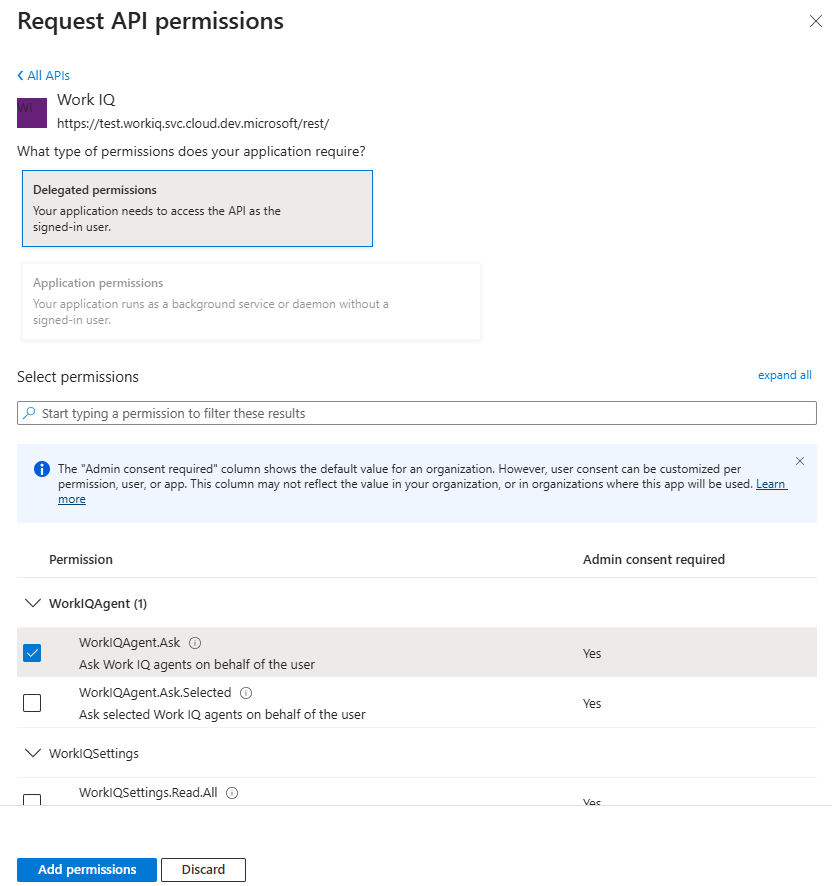
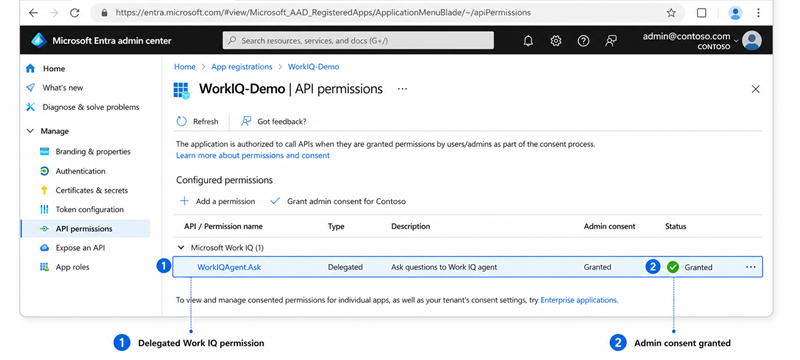
Work IQ uses delegated authentication. Requests run in the context of the signed-in user. On-behalf-of flows are supported, but application-only authentication is not.
I see that as part of the design rather than an inconvenience. There is no background service identity with unrestricted access to everybody’s work data.
Copy the application (client) ID and tenant ID. We need both in the sample.
Step 2: Create the project
Now let’s keep the project itself as small as possible: a plain console app and the one package we need for interactive sign-in.
dotnet new console -n WorkIQHello
cd WorkIQHello
dotnet add package Microsoft.Identity.ClientMSAL handles interactive authentication. The rest is standard HttpClient and System.Text.Json.
This sample targets .NET 10, but the protocol itself is not tied to that version.
Step 3: Acquire a token and send a message
With that in place, we can write the whole flow end to end: sign the user in, call the Work IQ gateway, and print the answer that comes back.
using System.Net.Http.Headers;
using System.Text;
using System.Text.Json;
using Microsoft.Identity.Client;

// --- 1. Acquire a delegated token for the Work IQ resource ---
const string ClientId = "<your-app-client-id>";
const string TenantId = "<your-tenant-id>";
const string Scope    = "api://workiq.svc.cloud.microsoft/.default";
const string Endpoint = "https://workiq.svc.cloud.microsoft/a2a/";

var app = PublicClientApplicationBuilder
    .Create(ClientId)
    .WithAuthority($"https://login.microsoftonline.com/{TenantId}")
    .WithDefaultRedirectUri()
    .Build();

var auth = await app
    .AcquireTokenInteractive(new[] { Scope })
    .ExecuteAsync();

// --- 2. Build an HttpClient pointed at the Work IQ gateway ---
var http = new HttpClient();
http.DefaultRequestHeaders.Authorization =
    new AuthenticationHeaderValue("Bearer", auth.AccessToken);
http.DefaultRequestHeaders.Accept.Add(
    new MediaTypeWithQualityHeaderValue("application/json"));

// Opt in to the A2A v1.0 wire format. Without this header the gateway
http.DefaultRequestHeaders.TryAddWithoutValidation("A2A-Version", "1.0");

// --- 3. Build an A2A message wrapped in a JSON-RPC envelope ---
var message = new Dictionary<string, object?>
{
    ["role"]      = "ROLE_USER",
    ["messageId"] = Guid.NewGuid().ToString(),
    ["parts"]     = new object[] { new { text = "What meetings do I have today?" } },
    // Location lets Work IQ resolve "today" / "this week" in the user's local time.
    ["metadata"]  = new Dictionary<string, object>
    {
        ["Location"] = new
        {
            timeZoneOffset = (int)TimeZoneInfo.Local.BaseUtcOffset.TotalMinutes,
            timeZone = TimeZoneInfo.Local.Id
        }
    }
};

var rpc = new
{
    jsonrpc = "2.0",
    id = Guid.NewGuid().ToString(),
    method = "SendMessage",          // sync; "SendStreamingMessage" for SSE (Part 2)
    @params = new { message }
};

var content = new StringContent(
    JsonSerializer.Serialize(rpc), Encoding.UTF8, "application/json");

// --- 4. POST to the gateway base URL — the method lives in the body, not the path ---
var response = await http.PostAsync(Endpoint, content);
var body = await response.Content.ReadAsStringAsync();

if (!response.IsSuccessStatusCode)
{
    Console.WriteLine($"{(int)response.StatusCode} {response.StatusCode}\n{body}");
    return;
}

// --- 5. Pull the answer out of result.task.artifacts[].parts[].text ---
using var doc = JsonDocument.Parse(body);
var result = doc.RootElement.GetProperty("result");

Console.WriteLine(ExtractAnswer(result));
PrintCitations(result);

static string ExtractAnswer(JsonElement result)
{
    // A completed task carries the answer as one or more artifacts.
    if (result.TryGetProperty("task", out var task) &&
        task.TryGetProperty("artifacts", out var artifacts))
    {
        var sb = new StringBuilder();
        foreach (var artifact in artifacts.EnumerateArray())
            if (artifact.TryGetProperty("parts", out var parts))
                foreach (var p in parts.EnumerateArray())
                    if (p.TryGetProperty("text", out var t))
                        sb.Append(t.GetString());
        return sb.ToString();
    }
    return "(no answer found)";
}The sample is small, but three details are easy to miss.
The method is in the body
You post every request to the A2A gateway base URL. SendMessage is the JSON-RPC method; it is not a URL segment.
That felt unusual after years of REST APIs, where the path normally tells you what operation is happening.
The version header changes the wire format
Work IQ supports A2A 1.0 and 0.3. If you omit A2A-Version, the service currently falls back to 0.3 for compatibility.
The message above uses the 1.0 shape, including ROLE_USER. Sending that shape without the header can produce a “method not found” error that points you in the wrong direction.
Time-sensitive prompts need location
Words such as today, tomorrow and this week are ambiguous without a time zone.
The Location metadata gives Work IQ enough information to interpret those prompts for the current user. I now treat that metadata as part of the request rather than an optional enhancement.
Do not hide the sources
A fluent answer is not enough for an enterprise agent.
Users need to see where the answer came from, and developers need the same evidence when the output looks wrong. Work IQ returns attribution metadata that can be rendered as citations.
static void PrintCitations(JsonElement result)
{
    // Metadata can sit on the task's status message; shape mirrors the streaming case.
    if (!result.TryGetProperty("task", out var task) ||
        !task.TryGetProperty("status", out var status) ||
        !status.TryGetProperty("message", out var msg) ||
        !msg.TryGetProperty("metadata", out var meta) ||
        !meta.TryGetProperty("attributions", out var attributions) ||
        attributions.ValueKind != JsonValueKind.Array)
        return;

    Console.WriteLine("\nSources:");
    foreach (var a in attributions.EnumerateArray())
    {
        var name = a.TryGetProperty("providerDisplayName", out var n) ? n.GetString() : "(source)";
        var url  = a.TryGetProperty("seeMoreWebUrl", out var u) ? u.GetString() : "";
        Console.WriteLine($"  • {name}  {url}");
    }
}Run it (dotnet run), sign in when the browser pops up, and you should get back something like:
Today you have: 9 AM standup, 11 AM review with Dana, 2 PM customer call.

Sources:
• Calendar https://outlook.office.com/...The answer is grounded in the signed-in user’s Microsoft 365 context and returned with sources. We did not create a calendar connector, copy events into a vector store or write permission filters.
That is the point of the demo. Those roughly 40 lines replaced a collection of infrastructure I have spent much of the last year thinking about.
What I would not ship yet
This sample proves the integration, nothing more.
It has no conversational state. It waits for the entire response before showing anything. The JSON-RPC envelope and response parsing are handwritten. Token caching and production error handling are deliberately absent.
I still think starting here is useful. Seeing the raw request removed several wrong assumptions I had about Work IQ, particularly the difference between its token audience and Microsoft Graph.
But I would stop using raw JSON at this point.
Part 2 replaces it with the A2A .NET SDK, preserves context between turns and streams the answer as it arrives.
The bigger reason I am exploring Work IQ
Our private AI work has repeatedly pulled us toward the same operational problems: maintaining agents, tools, connectors, retrieval and permissions across systems that keep changing after the demo is finished. That’s what pulled me into Work IQ.
Work IQ will not remove every one of those problems. It may, however, let us stop rebuilding the Microsoft 365 part.
That is a meaningful improvement.
Code for this series is available in AhmadiRamin/work-iq-samples. Next: building a conversational client with the A2A SDK.
